
Honda Fit: Vehicle
 INFO button
► Setup ►Other
►Vehicle
Set the off-road tracking feature and correct the vehicle position displayed on the map.
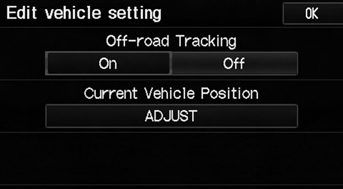
Select an item.
The following items are available:
• Off-road Tracking: Set whether to display the tracking dots on the map.
• Current Vehicle Position: Adjust the position of the vehicle on the map.
See also:
Audio Control Display
Press the AUDIO button to display the audio system on the
navigation screen.
...
Calculating the Route
This section describes how to calculate your route.
1. Select Set as Dest.
► The system calculates and
displays the route line on the
map screen.
The following items are available:
• R ...
Carbon Monoxide Hazard
Your vehicle’s exhaust contains carbon monoxide gas. Carbon monoxide should not
enter the vehicle in normal driving if you maintain your vehicle properly and follow
the information on this page. ...
Categories
