
Honda Fit: Off-road Tracking
 INFO button
► Setup ►Other
►Vehicle
The navigation system can be set to display white off-road tracking dots (“breadcrumbs”) on the map screen whenever you drive into an area approximately 1/2 mile away from a mapped road.
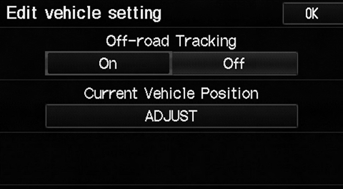
Select an option.
The following options are available:
• On: The system displays the white tracking dots.
• Off (factory default): Disables the feature.
To clear existing breadcrumbs, set Off-road Tracking to Off, exit the Setup screen, and then set Off-road Tracking to On again.
See also:
Opening and Closing the Windows
Opening/Closing the Power Windows
The power windows can be opened and closed when the ignition switch is in ON
, using the switches on the doors.
The driver’s side switches can be used to open
...
ATF Replacement (A/T)
NOTE: Keep all foreign particles out of the transmission.
Warm up the engine to normal operating temperature (the radiator fan
comes on), and turn the engine off.
Raise the vehic ...
Front Stabilizer Bar Replacement
Removal
Remove the front subframe.
Remove the steering gearbox from the front subframe.
Remove the flange bolts (A) and the bushing holders (B), then remove the
...
Categories
