
Honda Fit: Rear License Plate Light Bulb
When replacing, use the following bulb.
Rear License Plate Light: 5 W
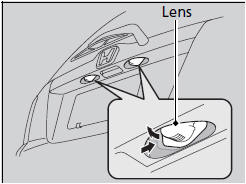
1. Push the lens on the left and pull out the lens and the socket attached to it.
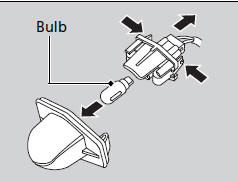
2. Remove the license plate light assembly by squeezing the tabs on both sides of the socket.
3. Remove the old bulb and insert a new bulb.
See also:
Security System Alarm
The security system alarm activates when the doors, tailgate, or hood are
opened
without the key, or remote transmitter.
■ When the security system alarm activates
The horn sounds intermitt ...
Towing Your Vehicle Behind a Motorhome
Your vehicle can be towed behind a motorhome at legal highway speeds up to 65
mph (100 km/h). Do not exceed 65 mph (100 km/h).
Otherwise, severe transmission damage will occur.
When purchasing a t ...
Gearing Up for Adventure with Subaru Outback old but proven 2.0L Diesel
With a plethora of engine and transmission combinations available in the 2024 Outback, we'll delve into the option most likely to resonate with the adventurous spirit: the 2.0L turbo diesel paired w ...
Categories
