
Honda Fit: Safety Labels
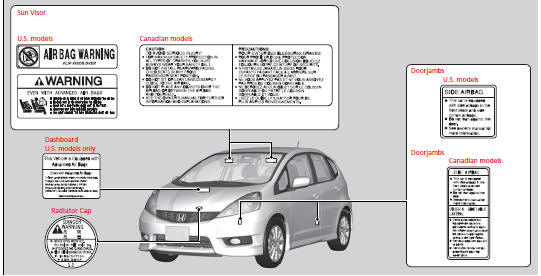
Label Locations
These labels are in the locations shown. They warn you of potential hazards that can cause serious injury or death. Read these labels carefully.
If a label comes off or becomes hard to read (except for the U.S. dashboard label which may be removed by the owner), contact a dealer for a replacement.
See also:
Powertrain
...
PCV
Fuel and Emissions System Description - PCV System
Positive Crankcase Ventilation (PCV) System
The PCV valve prevents blow-by gasses from escaping into the atmosphere
by venting them into the ...
Brake Light, Taillight, Back-Up Light and Rear Turn
Signal Light Bulbs
When replacing, use the following bulbs.
Brake/Taillight: 21/5 W
Back-Up Light: 16 W
Rear Turn Signal Light: 21 W (Amber)
1. Pry on the edge of the cover using a flat-tip
screwdriver to remove ...
Categories
