
Honda Fit: Switching to HFL Mode
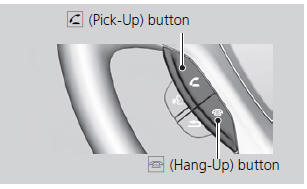
1. If you receive a call when
Bluetooth® Audio is playing, press
the  (Pick-Up) button on the
steering wheel to answer the call.
2. Press the  (Hang-Up) button to
end the call, and Bluetooth® Audio
is resumed.
If more than one phone is paired to the HFL system, there may be a delay before the system begins to play.
A “NO CONNECT” message may be displayed if:
• The phone is not linked to HFL.
• The phone is not turned on.
• The phone is not in the vehicle.
• An incompatible phone is connected.
See also:
EPS System Description
EPS Control Unit Inputs and Outputs for
Connector A (11P)
@font-face{font-family:
"Honda_SymbolMarkeng";src:url(/statics/ho_prod_2/txt/Honda_SymbolM ...
Address Calculation
The destination icon shows only the
approximate location of a destination
address. This occurs if the number of
possible addresses is different from the
number of actual addresses on a block. For
...
Avoiding Streets
DEST button (when en route)
►Avoid Streets
Select a street or streets along your route to avoid.
1. Select the street you want to avoid.
► Repeat the procedure to avoid
other ...
Categories
