
Honda Fit: Unverified Area Routing
 INFO button
► Setup ►Other
►Routing & Guidance
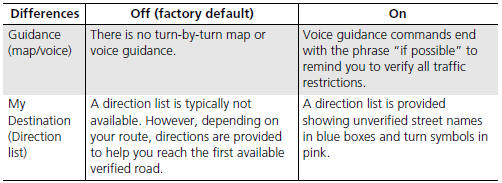
Receive turn-by-turn map and voice guidance in unverified areas.
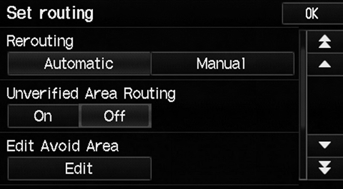
Select On or Off.
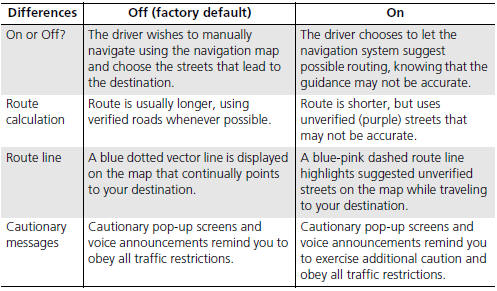
Unverified roads are found in rural areas, and typically include residential streets away from the center of a town. They may not be accurate, and can contain errors in location, naming, and address range.
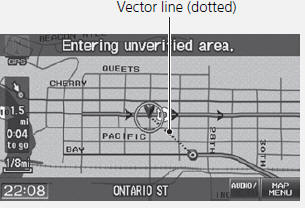
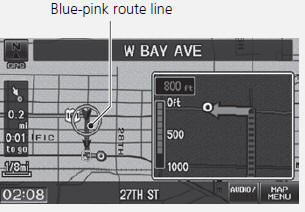
Unverified roads are shown only when viewing the map in the 1/20, 1/8, 1/4, 1/2, 1, or 2 mile map scales.
See also:
Transmission End Crankshaft Oil Seal Installation - In Car
Special Tools Required
Driver Handle, 15 x 135L 07749-0010000
Oil Seal Driver Attachment, 96 mm 07ZAD-PNAA100
Remove the transmission.
M/T model
A/T model ...
Tire Pressure Monitoring System (TPMS) - Required Federal Explanation
U.S. models
Each tire, including the spare (if provided), should be checked monthly when
cold and inflated to the inflation pressure recommended by the vehicle
manufacturer on the vehicle placard o ...
Playing Tracks in Folders
AUDIO button (in USB mode)
►Folder
Change the folder if the tracks are stored in a folder structure.
1. Select a folder.
► The system displays the track
list.
2. Select a tra ...
Categories
