
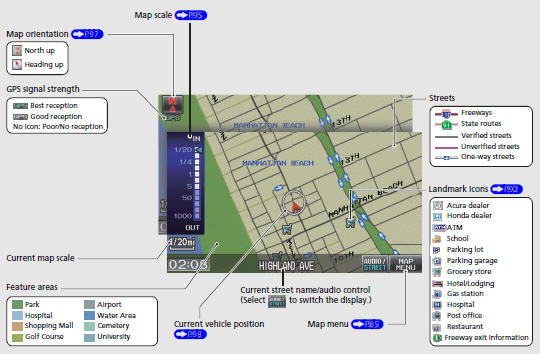
Honda Fit: Map Screen Legend
Second generation (2007-2026) / Honda Fit 2007-2026 Navigation Online Reference Manual / Quick Reference Guide / Map Screen Legend
See also:
Precautions for Opening/Closing the Tailgate
Always make sure individuals and objects are clear of the tailgate before
opening or
closing it.
■ Opening the tailgate
• Open the tailgate all the way.
►If it is not fully opened, ...
Important Safety Precautions
■ Always wear your seat belt
A seat belt is your best protection in all types of collisions. Airbags are
designed to
supplement seat belts, not replace them. So even though your vehicle is e ...
Viewing the Route
Map Screen
After calculating the route to your
destination, the route is displayed on
the map screen.
As you drive, the system tracks your
position on the map in real time and
provides guida ...
Categories

© 2026 Copyright www.hfitinfo.com