
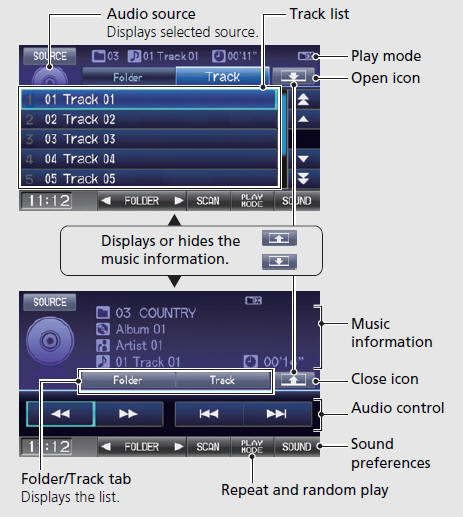
Honda Fit: Audio Control Display
Second generation (2007-2026) / Honda Fit 2007-2026 Navigation Online Reference Manual / Quick Reference Guide / Audio System / Audio Control Display
Press the AUDIO button to display the audio system on the navigation screen.
See also:
Controls
This chapter explains how to operate the various controls necessary for
driving. ...
Keys and Locks
On Sport model
Your vehicle comes with the two ignition keys.
All models except Sport
You should have received a key number tag with your keys. You will need this
key number if you ever have ...
Transmission Range Switch Replacement (A/T)
Raise the vehicle on a lift, or apply the parking brake, block the rear
wheels, and raise the front of the vehicle. Make sure it is securely
supported.
Shift to N.
...
Categories

© 2026 Copyright www.hfitinfo.com