
Honda Fit: Remote Transmitter Care
Replacing the Battery
If the indicator does not come on when the button is pressed, replace the battery.
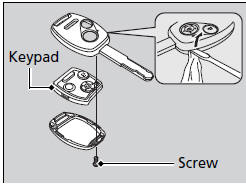
Battery type: CR1616
1. Unscrew the cover with a small Phillipshead screwdriver.
► Wrap the small flat-tip screwdriver with a cloth to prevent scratching the transmitter.
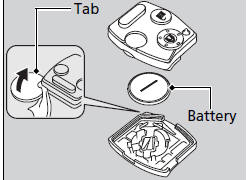
2. Open the keypad.
► Wrap a coin with a cloth to prevent scratching the transmitter.
3. Make sure to replace the battery with the correct polarity.
NOTICE
An improperly disposed of battery can damage the environment. Always confirm local regulations for battery disposal.
Replacement batteries are commercially available or at a dealer.
See also:
Engine Assembly Torque Rod Bracket Replacement
Raise the vehicle on the lift.
A/T model: Remove the shift cable cover.
Support the transmission with a transmission jack and a wood block under
the transmission a ...
Inspection
Install the flange nut on the damper shaft end, and set the socket wrench
and T-handle on the nut.
Compress the damper assembly by hand, and check for smooth operation
through ...
Ball Joint Boot Inspection/Replacement
Special Tools Required
Bearing Driver Attachment, 40 mm 07GAF-SE00200
Check the ball joint boot for weakness, damage, cracks, and grease leaks.
NOTE:
If the ball joint boot is ...
Categories
