
Seat Arona: Overview and controls
Connect System
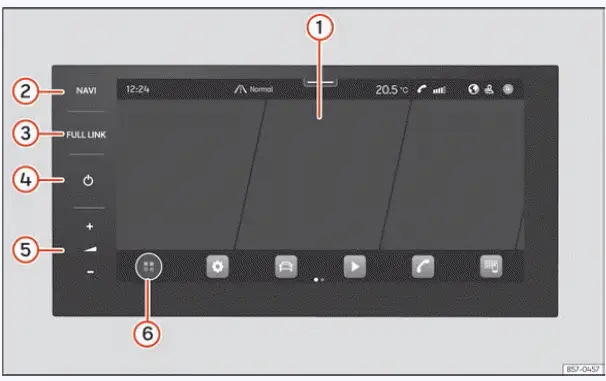
Fig. 135 Overview: control unit
- Touch screen. You operate the infotainment functions directly through the touch display.
- Navigation menu access for route planning and maps.
- Access the Full Link menu to connect compatible smartphones.
- Turn the infotainment unit on or off.
- Turn audio volume up or down.
- Main menu in tile mode for quick access to system views.
Media System
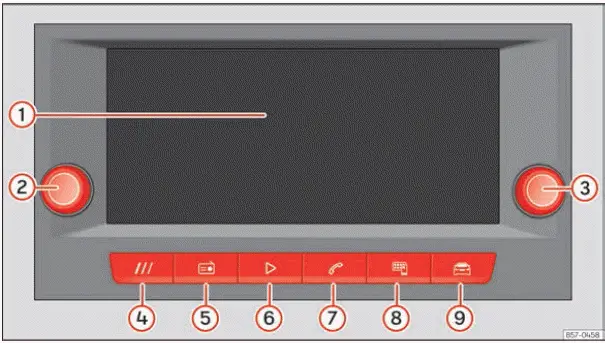
Fig. 136 Overview: control unit and indication in
the 8.25-inch version
- Touch screen. You operate the infotainment functions directly through the touch display.
- Rotary push button used to adjust volume and switch the infotainment unit on or off.
- Rotary push button used to browse, search, and select menu options.
- HOME button to return to the start page.
- Radio menu for broadcast stations and presets.
- Multimedia menu for audio and media playback.
- Telephone menu for paired mobile phones and calls.
- Full Link menu for smartphone screen projection.
- Vehicle menu for car settings and status information.
See also:
Vehicle Identification Number (VIN)
Your vehicle has a 17-digit vehicle identification number (VIN) used to
register your
vehicle for warranty purposes, and for licensing and insuring your vehicle. See
the
image below for the VIN ...
Tire Pressure Sensor Replacement (USA models)
Removal
notice
Each tire pressure sensor contains a lithium anode battery that is
not removable. The complete tire pressure sensor should be disposed of
according t ...
Unverified Area Routing
INFO button
► Setup ►Other
►Routing & Guidance
Receive turn-by-turn map and voice guidance in unverified areas.
Select On or Off.
Unverified roads are found in rural ar ...
Categories
