
Seat Arona: Privacy mode
Introduction
Using the "Privacy" menu in your Seat Arona, you can control whether data transfers between the car and the Internet are permitted or blocked.
Out of the factory, your Seat Arona stays connected by default so it can receive remote software updates aimed at refining vehicle performance and system stability.
Specific vehicle identifiers, including your VIN (vehicle identification number), may be shared with the
manufacturer so each update campaign completes accurately, though final installation always waits for your
confirmation on screen. If you prefer not to receive these updates, switch your profile to  Incognito (maximum
privacy) mode inside the privacy and services menu.
You can choose your preferred privacy level by opening Users > Settings > Privacy and Services on the infotainment display.
Keep in mind that the "Privacy" setting cannot block external devices from transmitting data or communicating directly with the vehicle.
Legally mandated services and their associated data transmissions—such as the emergency call system (eCall)—always stay active and cannot be disconnected or switched off.
Note
Every person with a profile in the car can adjust their own settings inside the "Privacy" function.
As a result, another driver's chosen privacy settings may differ from what the vehicle owner prefers.
Privacy and services settings
Individual SEAT CONNECT services in the Seat Arona can be turned on or off one by one—simply tick or clear the checkbox next to each service you want to change. If you would rather turn off every connected service in one step, use the main privacy mode selector instead.
Privacy mode.
Lets you enable or disable connected services together based on the privacy tier you choose.
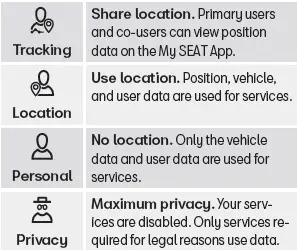
Available privacy menu options vary depending on the country market and specific Seat Arona model configuration.
Connectivity status indication
The status icons listed below appear on the infotainment display to show the vehicle's current data connection state:
 Symbol white: full
connectivity, with all subscribed online services ready to use.
 Symbol grey: limited
connectivity, meaning certain online services may be temporarily unavailable.
 No connectivity, so connected
services are offline and unavailable.
See also:
Drive Belt Inspection
Inspect the belt for cracks or damage. If the belt is cracked or damaged,
replace it.
Check that the position of the auto-tensioner indicator (A) is within the
standard range ( ...
Changing bulbs
Tail light bulbs located in the bodywork
Fig. 170 Luggage compartment: access to the
bolt securing the tail light unit.
Fig. 171 Retaining tabs on the reverse side of
the tail light.
...
A/T System Description - Clutches and Gears (A/T)
Clutches and GearsThe five-speed automatic transmission uses
hydraulically-actuated clutches to engage or disengage the transmission
gears. When hydraulic pressure is introduced into the clut ...
Categories
