
Seat Arona: Activation of SEAT CONNECT and SPIN. Ownership and identity accreditation
Activation of SEAT CONNECT and SPIN
Setting up SEAT CONNECT in your Seat Arona—including initial account registration—follows a clear step-by-step sequence on the cabin display and your phone:
1. Switch on the vehicle ignition and power up the infotainment system.
2. Open the privacy settings and set the active privacy mode to "Tracking".
3. Tap:  Users and then press the button
 to create and add a new user profile.
4. Follow the prompts shown on the screen to download the My SEAT App onto your smartphone.
5. Complete the guided setup steps to register your personal SEAT ID.
6. Read through and accept the Privacy Policy.
7. Type in your Seat Arona vehicle identification number (VIN) to link the car to your user account.
8. Review and confirm that your personal profile details are accurate.
9. Choose the SEAT CONNECT online services package assigned to your vehicle.
10. Launch the mobile app and scan the newly generated QR code displayed on the infotainment screen.
Continue following the remaining prompts and on-screen guidance inside the infotainment system until setup wraps up, during which you may also be prompted to set up a personal S-PIN.
S-PIN
Your S-PIN is a multi-digit security code that you choose once SEAT CONNECT registration is complete.
Pick a combination that is hard to guess, steering clear of obvious number patterns or familiar birth dates.
Whenever you need an update, you can modify your S-PIN inside your SEAT CONNECT profile under "Account settings".
This S-PIN acts as a safeguard for your user profile and is required before activating security-sensitive SEAT CONNECT functions on your Seat Arona.
Treat your S-PIN as strictly private and never share it with anyone else.
If another person ever learns your S-PIN, change the code right away to protect vehicle access.
Ownership and identity accreditation
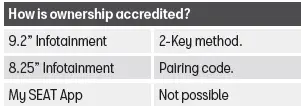
Depending on which infotainment unit is fitted in your Seat Arona, proving primary vehicle ownership uses either the two-key verification process or a digital registration code.
9.2" Infotainment system
To register as the primary user and verify ownership of the Seat Arona, keep both physical vehicle keys on hand inside the cabin. You complete ownership verification right in the car during initial setup, or—if you already hold a SEAT CONNECT account—by signing in on the infotainment display and opening User management:
- Turn on the ignition along with the infotainment system.
- Start SEAT CONNECT registration directly through the infotainment screen.
- Alternatively, navigate to Manage users > Settings > Become primary user and follow the on-screen prompts.
- Press the unlock button on the first physical vehicle key.
- Press the unlock button on the second physical vehicle key to finish pairing.
8.25" Infotainment system
To claim primary user status and verify ownership on this unit, retrieve the registration code displayed on the SEAT website or inside the My SEAT App after adding your car to your profile (My Garage > Add Vehicle > Accept terms and conditions and SEAT privacy policy). Complete the pairing inside the Seat Arona by opening Vehicle settings > SEAT CONNECT > Registration and typing in the pairing code from the My SEAT App. Once the infotainment unit processes the radiofrequency confirmation, ownership accreditation is finished, and you can verify the active status inside the My SEAT App.
Identity accreditation (SEAT ID)
Before security-critical SEAT CONNECT tools such as "Remote Opening" can be unlocked for daily use, you must complete SEAT ID identity accreditation. You can verify your identity in person at an authorized SEAT dealership with help from a brand specialist, or handle the verification yourself online straight through the My SEAT App.
Full guidance and extra details on SEAT ID verification are available directly inside the My SEAT App.
See also:
Specifications
*1: Sport models
*2: Not available on all models
*1: Automatic transmission models
*2: Manual transmission models
*1: All models except Sport models
*2: Sport models
*3: U.S. models ...
Change Lever Clearance Inspection (M/T)
Measure the clearance between the change lever (A) and the select lever
(B) with a feeler gauge (C). If the clearance is more than the service
limit, go to step 2.
...
Exhaust Gas Hazard
Carbon Monoxide Gas
The engine exhaust from this vehicle contains carbon monoxide, a colorless,
odorless, and highly toxic gas. As long as you properly maintain your vehicle,
carbon
monoxide gas ...
Categories
