
Seat Arona: Rear Cross Traffic Alert
How it works
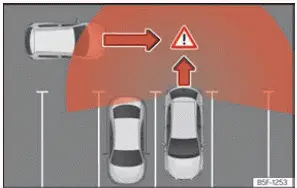
Fig. 130 Park assist diagram: detected area
around the vehicle that is driving off.
Using rear bumper radar sensors, Park Assist monitors cross-traffic moving behind your Seat Arona as you reverse out of a bay or manoeuvre in tight spots, such as when visibility is heavily restricted.
When the system picks up a moving vehicle approaching behind the car ››› Fig. 130 that poses a relevant conflict, an acoustic warning can sound.
Alongside the audible chime, a visual alert shows on the infotainment screen as a red bar at the rear of the vehicle graphic, highlighting which side cross-approaching traffic is coming from1).
Connecting and disconnecting
You can turn Rear Cross Traffic Alert on or off via the Assistants menu on the instrument cluster using the steering wheel controls; if your Seat Arona has a multifunction camera, you can also open it with the driver assistance button on the main beam headlight stalk.
When you restart the vehicle, the last setting stored in the system stays active.
Trailer mode
Rear Cross Traffic Alert switches off automatically and cannot be enabled while a tow bar is electrically connected to a trailer or similar attachment; once you start driving, an instrument cluster message lets you know the assistant is turned off.
After you uncouple the trailer, the assistant returns to the state it had before electrical connection.
If the tow hitch is not factory fitted, turn Rear Cross Traffic Alert off manually before towing a trailer.
WARNING
- Rear Cross Traffic Alert relies on smart technology that cannot override physical limits or the laws of physics and operates strictly within system boundaries; never let Park Assist tempt you into taking unsafe risks, as no system replaces driver awareness.
- Never rely on the system in poor visibility or complex traffic—such as busy junctions or when crossing multiple lanes.
- Keep a close eye on the area around your Seat Arona at all times, since the system often does not detect cyclists or pedestrians.
- Rear Cross Traffic Alert does not bring the car to a full stop on its own.
- Watch for warning lamps in the exterior mirrors and on the instrument cluster, and follow any guidance they display.
See also:
Database
The digitized map database reflects
conditions as they existed at various points
in time before production. Accordingly,
your database may contain inaccurate or
incomplete data or information due ...
Fuel Line Inspection
Check the fuel system lines and hoses for damage, leaks, and deterioration.
Replace any damaged parts.
Check all clamps, and make sure they are properly positioned and tightened.
...
Selecting a parking type
Fig. 124 On the instrument cluster display:
display of the assisted parking system with
decreased visibility.
Fig. 125 On the instrument cluster display:
parking modes indication.
...
Categories
