
Seat Arona: Selecting a parking type
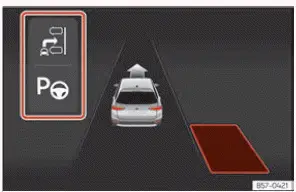
Fig. 124 On the instrument cluster display:
display of the assisted parking system with
decreased visibility.
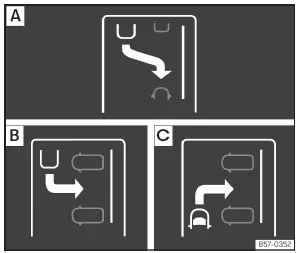
Fig. 125 On the instrument cluster display:
parking modes indication.
Park Assist on your Seat Arona supports these 3 parking types:
- Reverse parallel parking.
- Reverse angle parking.
- Forward angle parking.
Selecting a parking type after passing in front of the space
Once you turn on Park Assist and it spots a parking space, a suggested parking mode appears on the instrument cluster screen, chosen automatically by the Park Assist system.
The active mode shows on the instrument cluster display ››› Fig. 124, alongside a smaller preview of alternative
parking modes ››› Fig. 125; if the automatically proposed mode does not match what you want, press the  button to switch to another option.
- All operating prerequisites for parking with Park Assist must be met.
- Press the
 button.
- An indicator light on the
 button turns on when the system is active, while the
instrument cluster shows the chosen parking mode and the smaller display previews another mode you can
select.
- Flick on the turn signal toward the side of the road where you plan to park.
The instrument cluster reflects the side of the road selected; if no turn signal is used, the system defaults to parking on the right side in the direction of traffic flow.
- Where needed, press the
 button again to step to the next parking mode.
- After cycling through every available parking mode, pressing the
 button once more turns the system off.
- Press the
 button again to turn the system back on.
- Watch traffic around your Seat Arona, follow the prompts on the instrument cluster display, and drive past the parking space.
Parking in a parking bay without driving past first
Specific procedure for pulling forward into a parallel bay without passing it first:
- All operating requirements for parking with Park Assist must be satisfied.
- Keep an eye on surrounding traffic as you pull forward toward the spot and stop once the front end of your Seat Arona sits partly inside the bay.
- Press the
 button once.
- A control lamp on the
 button lights up when the system turns on, and the selected
parking mode appears on the instrument cluster without the reduced mode preview.
- Take your hands off the steering wheel.
See also:
Tire Service Life
The life of your tires is dependent on many factors, including driving
habits, road
conditions, vehicle loading, inflation pressure, maintenance history, speed, and
environmental conditions (even ...
Troubleshooting
The engine does not start
The indicator lamp illuminates in green.
The brake pedal is not pressed down, for instance when you attempt to move the gear selector lever.
Depress the brake peda ...
Seat belt buckled indication
Lights up red
Either the driver or a passenger in the Seat Arona has left their seat belt unfastened.
This control lamp illuminates on the display to prompt the driver to fasten their seat belt bef ...
Categories
