
Seat Arona: Rear park assist
Description
Rear park assist on your Seat Arona provides visual prompts and audible beeps to warn you about obstacles behind the car.
Sensors fitted into the rear bumper detect nearby objects and alert you through sound signals and the infotainment display.
Keep sensor faces clear of stickers, residue, dirt, and similar buildup, as anything covering them can disrupt performance.
Follow the cleaning instructions carefully.
Approximate detection ranges for the rear sensors are:
- Side zones: 0.60 m
- Centre zone: 1.60 m
As you move closer to an obstacle, the audible beeps speed up and become a steady tone around 0.30 m—stop the vehicle! If you stay at that same distance, the warning volume drops after roughly 4 seconds.
Parking Aid connection
- Engage reverse gear.
Parking Aid disconnection
- Drive forward at roughly 15 km/h (9 mph) or faster.
- Or move the selector lever to P, N, or D (on automatic gearboxes), or shift out of reverse (on manual gearboxes).
Moving the lever to N or D keeps the system active for roughly 8 seconds before it switches off, though shifting to P during that window deactivates the parking aid right away.
Temporary sound suppression
- Tap the
 function button on the
infotainment screen.
Change from reduced view to full view
- Engage reverse gear.
- Or, on models equipped with a Rear View Camera (RVC), tap the car icon on the reduced screen.
Switch to the reverse assist image (Rear View Camera "RVC")
- Engage reverse gear.
- Or press the "RVC" function button on the display.
Parking assist settings
You can adjust acoustic alerts and volume settings in the infotainment system:
- Rear volume: Volume level for rear alerts.
- Reduce volume: Lowers media or audio source volume when the parking aid turns on, according to your setting.
- Rear sound settings/treble: Tone adjustment for rear warning sounds.
Error messages
A fault or error prompt shown on the instrument cluster for Parking assist indicates a system fault.
If a fault clears or is no longer active before you switch off the ignition, it will not appear again the next time you connect the parking aid.
When a sensor has a fault, the fault symbol appears on the infotainment screen.
Have a specialist workshop inspect and fix the fault on your Seat Arona.
Towing device
On vehicles with a factory-fitted tow hitch, connecting a trailer prevents the rear parking aid from activating automatically when reverse gear is selected.
Visual indication segments
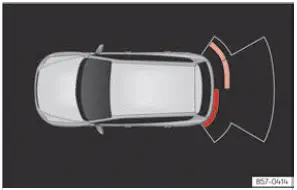
Fig. 122 Park assist view on the Infotainment
system display.
You can judge how close objects are behind your Seat Arona using the visual segments shown for the rear of the car.
Optical distance segments on the screen behave as follows:
- White segments: an obstacle lies more than roughly 30 cm outside your travel path or in the opposite direction of travel, and these segments also show when the parking brake is set.
- Yellow segments: obstacles sit along your vehicle's path at less than roughly 30 cm away.
- Red segments: obstacles are less than roughly 30 cm away.
When an obstacle sits in your direction of travel, the matching audible warning chime sounds.
Once the penultimate segment lights up, your Seat Arona has reached the collision zone, where obstacles appear in red—even outside the projected path—so bring the car to a stop right away!
See also:
Interior Convenience
Glove Box
Pull the handle to open the glove box.
WARNING
An open glove box can cause serious injury
to your passenger in a crash, even if the
passenger is wearing the seat belt.
Always keep ...
Automatic retractor, tensioner and
belt force limiter. Maintenance and disposal of seat
belt tensioners
Automatic retractor, tensioner and
belt force limiter
In the Seat Arona, the seat belts form a core part of the vehicle's occupant safety system, carrying out these
key protective functions:
Auto ...
Retrofitting a towing bracket
Fig. 151 Towing device: dimensions and
attachment points.
Distance measurements:
Attachment points (lower part of the vehicle)
65 mm (minimum)
350 mm to 420 mm (fully laden vehicle)
...
Categories
