
Seat Arona: Operating Park Assist Plus. Visual indication segments
Operating Park Assist Plus
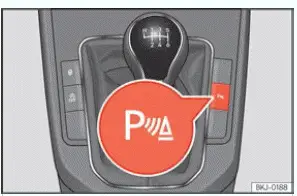
Fig. 120 Centre console: parking aid button
(depending on the version).
Switching on and off manually
- Press the
 button once to turn Park Assist Plus on or off by hand.
Automatic activation
- Engage reverse gear.
- Or, while driving forward below roughly 15 km/h (9 mph) and approaching an obstacle, the system picks it up at roughly less than 95 cm away—showing a compact reduced display when automatic activation is turned on.
- Or as your Seat Arona rolls backward.
When Park Assist Plus turns on automatically, a vehicle graphic and proximity segments appear on the infotainment display.
This automatic activation occurs once each time vehicle speed drops below roughly 15 km/h (9 mph).
You can enable or disable automatic park assist activation in the infotainment menu:
- Switch the ignition on.
- In the infotainment system, open
 > Settings > Parking and manoeuvring.
- Tick the Automatic activation checkbox.
- Or open Settings > Automatic activation directly inside the parking assistance screen.
When activated automatically, acoustic warnings for obstacles ahead sound only once an object comes closer than roughly 50 cm.
If you turn the system off using the button, automatic activation returns only after one of these steps:
- Turn the ignition off and switch it back on.
- Drive forward above roughly 15 km/h (9 mph).
- Shift the selector lever to P and back out of P.
- Toggle automatic activation off and back on inside the infotainment system.
Automatic disconnection
- Drive forward at roughly 15 km/h (9 mph) or faster.
- Or shift the selector lever into position P.
Temporary sound suppression
Tap the  function button on the infotainment
screen to mute warning tones temporarily.
Change from reduced view to full view
- Engage reverse gear.
- Tap the car symbol shown on the reduced display.
Switch to the reverse assist image (Rear View Camera "RVC")
- Engage reverse gear.
- Or tap the RVC function button on the screen.
A brief confirmation tone sounds and the button indicator illuminates once the system is switched on.
NOTICE
Park Assist Plus turns on automatically only at very low speeds; driving without matching your speed and manoeuvres to the surroundings on your Seat Arona can cause accidents, serious injury, or vehicle damage.
Visual indication segments
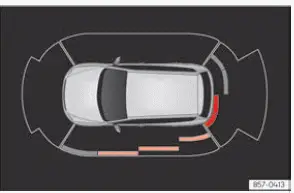
Fig. 121 Park assist view on the Infotainment
system display.
Proximity segments on the display work in this way:
- White segments: the obstacle sits more than roughly 30 cm outside your path or in the direction opposite to movement, and they also appear when the parking brake is engaged.
- Yellow segments: an obstacle lies in your vehicle's path at less than roughly 30 cm away.
- Red segments: an obstacle is less than roughly 30 cm away.
A trajectory guide line shows the projected forward or reverse path based on the engaged gear.
If an obstacle sits along your path, the matching audible alert sounds.
Once the penultimate segment lights up, your Seat Arona has entered the collision zone, where obstacles appear in red even if they lie outside the projected path—stop the car right away!
See also:
Adjusting the Seat Positions
Adjust the driver’s seat as far back as possible
while allowing you to maintain full control of
the vehicle. You should be able to sit upright,
well back in the seat and be able to
adequately ...
A/F Sensor Replacement
Special Tools Required
O2 Sensor Wrench Snap-on S6176 or equivalent, commercially available
Remove the cowl cover and the under-cowl panel.
Disconnect the A/F se ...
Clutch Pedal, Clutch Pedal Position Switch, and Clutch Interlock Switch
Adjustment (M/T)
NOTE:
For a cruise control problem, check the clutch pedal position switch.
For a clutch interlock operation problem, check the clutch interlock
switch.
Remove the driver' ...
Categories
