
Seat Arona: Driving with Side Assist
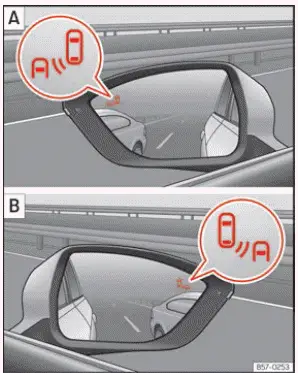
Fig. 114 Control lamp of the lane departure
warning.
Connecting and disconnecting
You can turn Side Assist on or off through the Assistants menu in the infotainment system or via the instrument cluster screen using the multifunction steering wheel controls. On versions equipped with a multifunction camera, you can also open the menu with the driver assistance button on the headlight and main beam stalk.
Once Side Assist is ready to operate, the indicator lamps light up briefly as confirmation.
When you restart your Seat Arona, the most recent setting saved in the system remains active.
Indication on the exterior mirror
The mirror indicator lamp alerts you on the corresponding side when traffic behind your Seat Arona poses a potential hazard: the left-hand lamp signals activity to the rear left, while the right-hand lamp signals activity to the rear right.
Aftermarket window tinting or dark tint film on the glass can make the exterior mirror warnings harder to spot clearly.
Keep the exterior mirrors clean, clear of snow and ice, and free of stickers or other items that could block the signal.
It lights up
Illuminates once briefly: Side Assist is switched on and ready for operation, such as when activating the system.
Glows steadily: Side Assist has detected a vehicle sitting in the blind spot.
Flashes
A vehicle is present in the adjacent lane and you have switched on the turn signal toward that side.
On models fitted with Lane Assist as well, a lane-change warning can also appear even without the turn signal engaged (Lane Assist "Plus").
When you switch on the ignition, the control lamps illuminate and go out after roughly 2 seconds while running their self-check.
If no warning light shows on the Side Assist indicator, the system has not detected another vehicle in the rear monitoring zone.
In low ambient light, the control lamps dim automatically, and you can adjust their brightness across up to five levels in the infotainment menu.
Lane assist Plus.
Lane Assist Plus becomes available when both Lane Assist and Side Assist are switched on, adding extra intervention steps described below.
If you begin a lane change in a potentially critical traffic situation:
- The warning lamp on the relevant side flashes even if you have not signaled.
- The steering wheel vibrates to alert you to a possible collision risk.
- Steering torque is applied to guide your Seat Arona back into its lane.
Driving situations
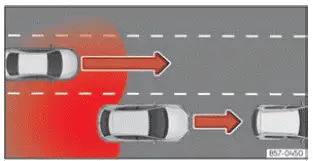
Fig. 115 Overtaking with traffic behind the
vehicle.
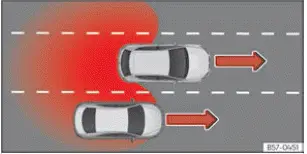
Fig. 116 Overtaking in the central lane and then
joining the right lane.
An alert appears on the control lamp ››› Fig. 114 (arrow) in these traffic scenarios:
- Another vehicle overtakes your Seat Arona ››› Fig. 115.
- You overtake another vehicle ››› Fig. 116 with a relative speed difference of roughly 10 km/h (6 mph); if you pass at a much higher speed differential, no warning is shown.
Because Side Assist factors in relative speed between vehicles, a faster-approaching car triggers an alert earlier than a slower one—even when the gap between the two cars is the same.
See also:
Introduction
With Full Link inside your Seat Arona, you can view and operate supported smartphone content and apps directly on
the infotainment display.
To use the wired connection, link your mobile phone to th ...
Storage compartment
Introduction
Use the storage compartments inside your Seat Arona exclusively for small, light items so everything stays put
while you drive.
WARNING
Loose items inside the cabin can be thrown ...
If Your Vehicle Gets Stuck
If your vehicle gets stuck in sand, mud, or snow, call a towing service to pull
it out.
For very short distances, such as freeing the vehicle, you can use the detachable
towing hook that mounts o ...
Categories
