
Seat Arona: Operating Travel Assist
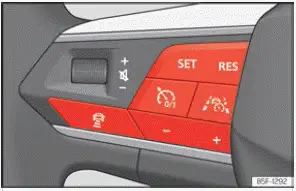
Fig. 113 Left side of the multifunction steering
wheel
Switch on and start regulation
1. While driving with ACC already enabled, press the  button on the multifunction
steering wheel.
Your Seat Arona switches over from ACC mode to Travel Assist.
Depending on current road and traffic conditions, Travel Assist enters one of these operating states:
- When ACC was already actively regulating, Travel Assist holds your current speed and the chosen distance gap
behind the vehicle ahead.
As soon as lane lines are recognized, steering guidance also helps keep the vehicle centered within the lane.
- When ACC was not actively regulating beforehand, Travel Assist is selected in a passive standby state without active speed or lane control.
Press the  button.
Travel Assist shifts into its active regulating state according to the driving situation.
An indicator lamp matching the current driving situation lights up on the instrument cluster screen, accompanied by a status message.
Interrupting regulation
1. Give the  button a brief press.
Or press the brake pedal.
Your chosen following distance remains stored in memory.
Switch to ACC
1. Press the  button on the
multifunction steering wheel.
The car transitions from Travel Assist back to the ACC state matching your current driving situation.
Making other adjustments
All remaining Travel Assist settings—such as speed and distance adjustments—are operated in the same way as ACC.
See also:
Interior lights
Lighting of the instrument cluster,
displays and controls
You can adjust how bright the instrument cluster, displays, and switch backlighting appear inside your Seat Arona
through the infotainmen ...
Description
Depending on trim and regional specification, your Seat Arona may be equipped with an anti-theft alarm system.
The alarm monitors the doors, engine hood, and rear lid.
The anti-theft alarm arms au ...
Introduction. Adjusting the headrests
Introduction
Options for adjusting and removing the head restraints on your Seat Arona are explained below; always verify that
the seats themselves are set properly first.
Every seating position co ...
Categories
