
Seat Arona: Interior lights
Lighting of the instrument cluster, displays and controls
You can adjust how bright the instrument cluster, displays, and switch backlighting appear inside your Seat Arona through the infotainment system:
- Open
 > Settings >
Lighting > Vehicle
interior lighting, or select
 >
Interior settings >
Lighting > Instrument cluster.
The chosen brightness level adjusts automatically as cabin light levels shift.
With automatic dipped beam control  switched on, a light sensor turns the dipped
beams—along with instrument and control lighting—on or off in response to surrounding brightness.
In certain situations—such as entering a tunnel without automatic dipped beam control
 active—illumination on the instrument cluster can even turn
off so you get a clear visual cue to switch on the dipped beams, and on models with a digital instrument cluster
a "Turn on the lights" message appears on the screen.
Interior and reading lights
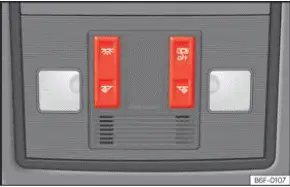
Fig. 71 Detail of headliner: front interior
lighting
 Switch the cabin interior lights on or off.
 Door-contact mode: interior
lights turn on automatically when you unlock the Seat Arona, open a door, or pull the key from the ignition, and
switch off a few seconds after you shut all doors, lock the vehicle, or switch the ignition on.
 Switch an individual reading light on or off.
Exact switch layout and controls can differ depending on vehicle version.
Luggage compartment lighting
The cargo area light switches on whenever you open the rear lid, even with the ignition and exterior lights turned off.
Because the light stays on while open, make sure the rear lid is always shut properly.
Background lighting
Ambient background lighting illuminates the center console and footwell areas, and—on equipped versions of the Seat Arona—also accents the front door panels and air vents.
It shines at full brightness when you open a door and dims while driving when the light control sits in position
 ,
 ,
or
 .
You can customize ambient lighting brightness and color in the infotainment menu via function button  >
Settings
> Background lighting, or select
 >
Background
lighting.
Note
If any door stays open after you switch off the ignition with door-contact mode active, interior lights turn off automatically after roughly 10 minutes to keep the battery from running down.
See also:
USB Commands
USB play
USB play track # (#: 1 to 30)
USB skip forward
USB skip back
USB track random*
USB track repeat*
USB track scan*
USB folder up
USB folder down
USB folder random*
USB folder repeat*
...
Side Defogger Vent Trim Removal/Installation
Special Tools Required
KTC Trim Tool Set SOJATP2014
*Available through the Honda Tool and Equipment Program; call
888-424-6857
NOTE:
Take care not to scratch the dashboard or its ...
Driver's Airbag Replacement
NOTE:
If replacing the driver's airbag after deployment, refer to
Component Replacement/Inspection After Deployment for a
complete list of other parts that must also be replaced.
...
Categories
