
Seat Arona: Driving with the Lane Assist System
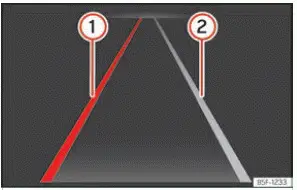
Fig. 111 On the instrument cluster display:
indications of the lane assist system.
- Yellow line: The system is actively applying steering assistance on the shown side.
- White line: Lane boundary detected, with intervention ready on that side.
When shown in grey, the lane boundary is detected but the system sits in a passive state or cannot intervene.
Control lamps
 Lights up grey
Lane Assist is set to passive mode and is not providing steering guidance.
 Lights up green
Lane Assist is switched on, active, and ready to assist.
 Lights up
yellow
Lane Assist is actively adjusting steering to guide the vehicle.
Switching the lane assist system on or off
Depending on country regulations, Lane Assist turns on automatically every time you switch the ignition on.
You can check connection status—and enable or disable the system—in the Driver assistance menu of the infotainment display or through the driver assistance menu after pressing the dedicated button.
Active steering intervention starts from roughly 65 km/h (40 mph) once lane lines are detected and the system is active.
Activating a turn signal puts Lane Assist into a passive state on the side you are signaling toward so you can change lanes manually, while keeping operation active on the opposite side.
A firm turn or quick counter-steer on the wheel temporarily places Lane Assist into a passive state.
 When Lane Assist is switched off,
the yellow disconnection indicator illuminates in the instrument cluster where required by local rules.
Note
If a fault in the system continues, Lane Assist can turn off on its own.
Driver intervention prompt
If you do not steer manually when prompted, the system shows an alert on the instrument cluster and sounds warning chimes.
If there is still no steering response from you, the system switches into a passive state.
Even during steering corrections, an instrument cluster alert and chimes prompt you to center your Seat Arona in the lane whenever steering support continues longer than normal.
Steering wheel vibration
You may feel vibration through the steering wheel in these situations:
- Lane markings are lost mid-correction while the system is actively steering.
You can also turn on steering wheel vibration in the infotainment Assistants menu so the wheel vibrates whenever your Seat Arona with Lane Assist active crosses a detected lane line.
See also:
Technical data
Indications about the technical data
Vehicle identification data
Published technical figures for the Seat Arona can vary based on factory options, model trim or version,
special-purpose builds, ...
Using HFL
HFL Buttons
( HFL Talk) button: Press
to go directly to give a command or to answer an
incoming call.
(HFL Back) button: Press to
end a call or to cancel a command.
Help Features
• To h ...
Parking Brake Inspection and Adjustment
Inspection
Pull the parking brake lever (A) with 196 N (20 kgf, 44.1 lbf)
of force to fully apply the parking brake. The parking brake lever should be
locked within the specif ...
Categories
