
Seat Arona: Introduction
Your Seat Arona features an electronically controlled automated manual gearbox that transfers engine torque through two separate clutches. Instead of relying on the hydraulic torque converter used in traditional automatic transmissions, this dual-clutch layout delivers crisp gear changes and smooth, uninterrupted acceleration.
Whenever you want direct control over shift points, the Tiptronic system lets you select gears manually—see the section on changing gear in Tiptronic mode.
Gear selector positions
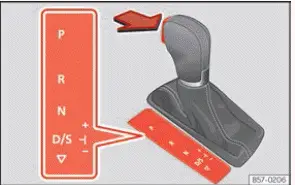
Fig. 85 Selector lever lock.
The currently active selector position is highlighted by its illuminated indicator symbol. When the lever is set to manual mode M, D, or S, the instrument cluster display also shows the exact gear engaged at that moment.
 - Parking lock
Moving the selector lever into P mechanically locks the driven wheels to hold the car in place. Engage P only once your Seat Arona has come to a complete standstill.
To shift into P or move the lever out of P, press and hold the selector lock button while keeping your foot firmly on the brake pedal.
 - Reverse gear
Select reverse gear solely when the vehicle is completely stopped and the engine is running at idle speed.
To move the selector into R, hold down the lock button on the lever while depressing the brake pedal at the same time. With the ignition switched on, placing the lever in R automatically illuminates the reversing lights.
 - Neutral
In position N, the transmission is in neutral and no drive torque is sent to the wheels.
When moving the lever out of N into D/S while stationary or rolling at speeds under 3 km/h (2 mph), depress the brake pedal first.
 - Permanent forward drive
position
Setting the lever to D/S lets the Seat Arona gearbox operate in either standard Drive mode (D) or Sport mode (S). Pull the selector lever rearward to toggle into Sport mode S, and pull it back again to return to normal mode D; the chosen mode appears clearly on the instrument cluster display.
In standard mode (D), the transmission control unit automatically chooses the most suitable gear ratio based on engine load, vehicle speed, and the dynamic regulation program (DRP).
Sport mode (S) is tailored for a livelier, more responsive driving style, holding gears longer to tap into the engine's maximum power output, with shift transitions becoming noticeably firmer during acceleration.
On demanding routes such as steep mountain roads, switching into Tiptronic mode gives you direct control over gear selection so you can match ratios precisely to the gradient and road conditions.
Selector lever lock
While the selector lever sits in P or N, an electromechanical lock prevents a driving range from being selected inadvertently and stops the vehicle from creeping forward or backward by accident.
To release the selector lock with the ignition switched on, press and hold the brake pedal while pressing the lock button on the gear lever in the direction of the arrow ››› Fig. 85.
As a visual prompt whenever the selector lever is in P or N, the instrument cluster screen displays a reminder to apply the brake before shifting:
Whenever your Seat Arona is at a standstill, keep your foot on the brake pedal while selecting a gear.
The selector lever does not lock if you pass through position N briskly—for instance when shifting between R and D—which makes it possible to gently rock a stuck car free. Once speed drops below 5 km/h (3 mph) without the brake pedal pressed, holding the lever in N for roughly one second causes the lever lock to engage automatically.
Ignition key removal lock
After switching off the ignition, you can pull the key out only once the selector lever is placed in position P. As long as the key remains removed from the ignition switch, the selector lever stays locked in P.
WARNING
- Avoid touching the accelerator pedal while the vehicle is stopped, as your Seat Arona can begin moving right away—sometimes even with the parking brake set—creating a serious risk of collision.
- Never shift the selector lever into R or P while the car is in motion.
Doing so can trigger a crash or cause severe transmission damage.
- Whenever the engine is running and the selector is in any position other than P, keep the brake pedal depressed, since the gearbox still transfers drive force even at idle speed.
- Do not apply throttle while choosing a gear with the engine idling and the vehicle stationary.
Ignoring this precaution can result in an accident.
- Never step out of the vehicle while the engine is running with a driving gear engaged; set the parking brake firmly and move the selector into parking lock (P).
Note
- If the selector slips into N by mistake while driving, take your foot off the throttle and let engine revs settle back to idle before selecting D or S again.
- If electrical power to the selector mechanism is lost while the lever sits in P, you will not be able to shift out normally and must use the manual release instead.
Note
- If the selector lever lock fails to engage on your Seat Arona, a system fault is present and drive power
is interrupted to stop the car from rolling unintentionally.
Carry out the reset steps below to restore lever lock engagement:
- On a 6-speed gearbox: press and release the brake pedal.
- On a 7-speed gearbox: press the brake pedal, move the selector lever to P or N, and then select a driving gear.
- If you have selected a gear and the vehicle fails to move forward or backward, work through the
following steps:
- When the car does not respond in the chosen direction, the transmission may not have completed gear engagement; press the brake pedal and reselect the gear position.
- If the vehicle still will not move in the intended direction, a fault exists within the system.
Have the transmission inspected and diagnosed by a qualified technician.
See also:
Storage compartment
Introduction
Use the storage compartments inside your Seat Arona exclusively for small, light items so everything stays put
while you drive.
WARNING
Loose items inside the cabin can be thrown ...
Calculating the Route
This section describes how to calculate your route.
1. Select Set as Dest.
► The system calculates and
displays the route line on the
map screen.
The following items are available:
• R ...
Seat heating
On the Seat Arona, the front seats feature three electric heating stages so you can warm the cushion and backrest
to suit cold weather.
Controlling seat heating
Press or
on the control pan ...
Categories
