
Seat Arona: Functions
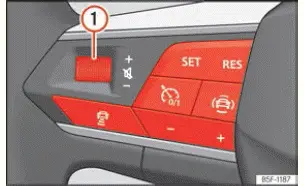
Fig. 58 Controls on the steering wheel.
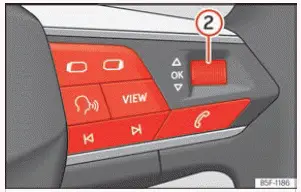
Fig. 59 Controls on the steering wheel.
The steering wheel on the Seat Arona houses multifunction modules so you can run audio, phone, navigation, voice control, and driver assist features while keeping your eyes and attention on the road ahead.
Buttons available depending on the version
- Turn: Adjust volume higher or lower.
Press: Mute or unmute audio volume.
- Turn: Scroll through menus on the instrument panel, or zoom the map in or out inside the instrument cluster
when in Navigation mode.
Press: Confirm and select the highlighted item in the instrument cluster.
 Radio: Tune to the previous or
next station.
Media: Press briefly to skip to the previous or next track; press and hold to fast-forward or rewind.
 Open the phone menu, and answer or end calls.
 Switch back and forth between media
and radio sources.
 Step through the instrument panel menu
to the previous or next screen.
 Turn voice control on or off.
 Cycle through available instrument
cluster display views.
 Turn Adaptive Cruise Control (ACC) on or off.
 Activate ACC, Travel
Assist, or the speed limiter.
 Clear or reset the stored target
speed.

 : Raise the programmed
speed.
 : Lower the programmed
speed.
 Choose between Travel Assist
and ACC.
 Bring up the driver assistants menu
inside the instrument cluster.
 Change the set following distance for
ACC.
See also:
Disc Player
...
PCV
Fuel and Emissions System Description - PCV System
Positive Crankcase Ventilation (PCV) System
The PCV valve prevents blow-by gasses from escaping into the atmosphere
by venting them into the ...
Driving abroad. Troubleshooting
Driving abroad
Dipped beam headlights on the Seat Arona produce an asymmetric beam pattern that throws stronger light onto the
side of the road matching your traffic side.
When driving a vehicle bu ...
Categories
