
Seat Arona: Changing the battery
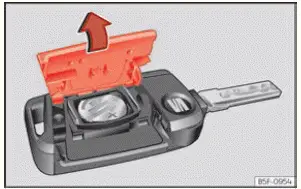
Fig. 45 Vehicle key: opening the battery
compartment.
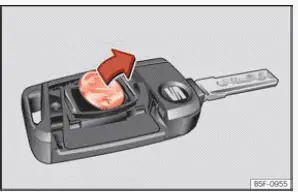
Fig. 46 Vehicle key: removing the battery.
SEAT recommends having a specialised workshop replace the battery for your Seat Arona key.
The button battery sits under a removable cover on the rear of the vehicle key housing.
Changing the battery
- Swing out the key blade on the vehicle key.
- Slide or lift off the cover on the back of the key following the arrow direction ››› Fig. 45.
- Carefully pry the old battery out of its slot using a suitable thin tool ››› Fig. 46.
- Insert a fresh button battery into the compartment.
- Snap the cover back onto the key body until it clicks firmly into position.
WARNING
Swallowing a 20 mm button battery—or any other coin or button cell—can cause severe internal injury or death in a very short time.
- Keep vehicle keys, spare fobs, and loose batteries well out of reach of children.
- Get urgent medical help right away if you suspect anyone has swallowed a battery.
NOTICE
- Incorrect battery replacement can damage the vehicle key electronics.
- Using an incompatible cell can harm the key, so always fit a replacement battery with matching voltage, dimensions, and specifications.
- Double-check battery polarity (+ and –) when placing the new cell inside.
For the sake of the environment
Dispose of spent batteries responsibly and in line with local environmental rules.
Synchronize the vehicle key
Pressing the  button repeatedly while out of range of the Seat Arona can cause the key to
lose sync so it no longer locks or unlocks the car; if that happens, resynchronize the key using these steps:
- Unfold the vehicle key blade.
- Take off the cap covering the driver's door handle lock cylinder if needed.
- Press the
 button on the key while holding the key inside the
vehicle.
- Unlock the vehicle mechanically with the key blade within one minute to complete synchronization.
- Refit the door handle cap if it was removed.
See also:
Remote Transmitter Care
Replacing the Battery
If the indicator does not come on when the button is pressed, replace the
battery.
Battery type: CR1616
1. Unscrew the cover with a small Phillipshead
screwdriver.
υ ...
Introduction
Park Assist works alongside ParkPilot on your Seat Arona to help locate suitable parking spaces for these
manoeuvres:
Reversing into perpendicular or parallel spaces,
Pulling forward into perp ...
Preparing the vehicle for work in the
engine compartment. Opening and closing the bonnet
Preparing the vehicle for work in the
engine compartment
Before carrying out any maintenance or inspection inside the Seat Arona engine compartment, complete these
preparation steps in the exact o ...
Categories
