
Seat Arona: Vehicle key
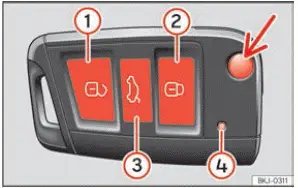
Fig. 43 Vehicle key
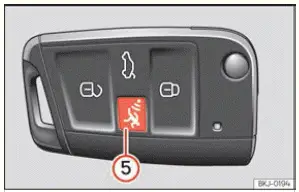
Fig. 44 Vehicle key with alarm button.
- Unlocks the Seat Arona.
- Locks the Seat Arona.
- Unlocks only the rear lid.
Press and hold this button until all turn signals on the vehicle flash briefly.
You have 2 minutes to open the rear lid.
Once those 2 minutes pass, the rear lid locks again automatically and the indicator lamp on the key flashes.
- Control lamp.
- Alarm button. Press this button only in an emergency! Pressing the alarm button sounds the vehicle horn and flashes the turn signals briefly; press it again to switch the alarm off.
To fold or unfold the key blade, press the release button ››› Fig. 43 (arrow).
You can lock and unlock the Seat Arona remotely using the vehicle key.
Inside the key housing are a radio transmitter and a battery.
The matching receiver sits inside the cabin of the vehicle.
With a fresh battery and remote control operation, the key works within a radius of several meters around the Seat Arona.
If the remote key fails to lock or unlock the vehicle, re-synchronize the key or replace its battery.
Any valid key assigned to the vehicle can be used.
Control lamp on the vehicle key
A brief press on a vehicle key button makes control lamp 4 ››› Fig. 43 blink once quickly, whereas holding the button down—for instance during comfort opening—causes it to flash multiple times.
If the control lamp on the key does not light up when you press a button, fit a new battery into the key.
Spare key
Ordering a spare key or an additional vehicle key requires the vehicle identification / chassis number.
Every replacement key houses a microchip that must be programmed to match the vehicle's electronic immobilizer data; a key without a programmed microchip will not work, even if the mechanical blade is cut specifically for your Seat Arona.
You can obtain vehicle keys or replacement spares through a SEAT Official Service center, a specialised workshop, or an authorized key specialist qualified to program these keys.
Newly supplied or spare keys require synchronization before first use.
WARNING
- Never leave children or people with limited mobility inside the vehicle, as they may be unable to exit or manage on their own during an emergency.
- Careless or unauthorized use of the key by others can operate electrical equipment such as power windows and create a crash or injury hazard, while locking the doors remotely can delay rescue access in an emergency.
- Always take the key with you when stepping out of the Seat Arona; leaving keys inside risks unauthorized use, injury, damage, or theft.
- Never pull the key out of the ignition while the vehicle is moving, as doing so can lock the steering unexpectedly and prevent you from steering.
NOTICE
Keep the vehicle key away from the wireless charger area to avoid signal interference.
NOTICE
Every vehicle key contains sensitive electronics, so shield it from physical impacts, moisture, and damage.
Note
- Press key buttons only when you need that specific function; accidental presses can unlock the car or trigger the alarm unexpectedly, even beyond normal operating range.
- Nearby radio interference operating on similar frequencies—such as radio transmitters or mobile phones—can noticeably affect key performance.
- Physical barriers between the key and the vehicle, harsh weather, and a weak battery can substantially shorten remote operating range.
- Repeatedly pressing buttons on the key or central locking switch in quick succession temporarily cuts
power to the central locking circuit as overload protection.
When that happens, the vehicle remains unlocked, so lock it manually or once the system resets if needed.
- Replacement remote keys are available through technical service and must be paired to the vehicle's locking system.
See also:
Drive Belt Inspection
Inspect the belt for cracks or damage. If the belt is cracked or damaged,
replace it.
Check that the position of the auto-tensioner indicator (A) is within the
standard range ( ...
Driver's Seat Position Sensor Replacement
Removal
NOTE: Do not turn the ignition switch to ON (II), and do not connect the
battery cable while removing the driver's seat position sensor.
Do the battery terminal disconnection ...
Transmission End Cover Park Lever Stop Inspection and Adjustment (A/T)
Set the park lever in the P position.
Measure the center-to-center distance (A) between the park pawl shaft (B)
and the park lever roller pin (C).
Sta ...
Categories
