
Seat Arona: Information call, Assistance call and Emergency call service
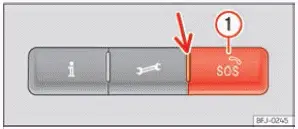
Fig. 42 On the roof console: controls for voice
services
Depending on vehicle specification and trim, the emergency call module and voice service controls are mounted on the roof console of the Seat Arona.
Pressing  ,
 and
 ››› Fig. 42 lets you initiate these voice
services:
- Information call.
- Assistance call.
- Emergency call service.
An integrated control unit handles call routing and establishes the connection from the Seat Arona.
Once you trigger a voice service, the system opens a voice link over a telephone line.
Control lamp.
An indicator lamp on the control unit ››› Fig. 42 (arrow) shows the current operating state through these signals:
- Off: the eCall service is unavailable.
- Flashes in red, approx. 20 seconds after switching on the ignition: the eCall service has been deactivated.
- Lights up red: indicates a system fault, meaning the eCall service operates only with certain restrictions; SEAT advises visiting a specialised workshop to have it checked.
- Lights up green: confirms the eCall service is active and available.
The system is ready to operate inside the vehicle.
- Flashes green: a voice call is currently in progress.
 Assistance call
Using the breakdown assistance call, you can reach specialized roadside help directly whenever the Seat Arona suffers a breakdown.
Along with the voice call, selected vehicle data—such as your current location—is sent automatically.
 Information call
Selecting the information call connects you directly with the SEAT S.A. customer care team for general inquiries.
Note
Placing breakdown assistance calls or information calls may generate extra charges on your mobile or telephone bill.
 Types of emergency call
- Public (mandatory by law): places an emergency call to the statutory emergency services of the country you are driving through, spoken in that country's local language.
- Private: routes an emergency call to a "SEAT call centre" that provides added support—such as handling the call in the language set on your infotainment system—while allowing you to cancel the private call at any point so local emergency services take over.
Private emergency call
Where the private emergency call service forms part of your Seat Arona's service package, it comes active by default for a set period.
- The emergency call service helps coordinate rapid assistance during urgent situations on the road.
- Activating the service connects the vehicle to the SEAT emergency call centre.
- Whether you place the emergency call manually or it triggers automatically in a crash when an airbag or seat belt pretensioner deploys, key vehicle details—such as the Seat Arona's current position—are transmitted automatically.
- Operators speak the language configured in the vehicle's infotainment system, falling back to English if that language is not supported in the region where the call is placed.
- Dedicated hardware—including a separate emergency microphone, an emergency speaker, and a backup battery independent of the main vehicle power supply—keeps the system working even after a severe collision.
- A qualified specialist can turn off the emergency call service permanently; SEAT recommends having this done at a SEAT dealership.
- If your vehicle includes the public emergency call system, you can switch off the private emergency call service through the web portal or app, or block data transfer in the infotainment system by enabling privacy mode.
Starting an emergency call manually
1. Press and hold the emergency call button for several seconds ››› Fig. 42 1.
This activates the emergency call and opens a voice connection to the emergency coordination centre.
You can also launch a manual emergency call through the infotainment system menu.
If you trigger the emergency call button by mistake, end the call right away:
1. Press and hold the emergency call button again until the indicator lamp remains steady green.
Note
Use the emergency call button strictly during real emergencies.
Automatic activation of an emergency call
In the Seat Arona, automatic emergency calling activates only when the ignition is switched on.
A link to the SEAT emergency call centre opens automatically under these conditions:
- Right after the airbags deploy.
- Right after the seat belt pretensioners activate.
Once triggered automatically, an emergency call cannot be canceled by pressing the emergency call button.
If operators at the SEAT emergency call centre cannot get a response from the cabin, emergency assistance is sent out automatically.
Integrated battery
A dedicated backup battery inside the Seat Arona keeps the emergency call system running for a period of time even if the main 12-volt battery becomes disconnected or fails.
When the integrated backup battery runs low or develops a fault, a warning message appears on the instrument cluster display; visit a specialised workshop to have the battery replaced.
EDR data transmission
Whenever an emergency call goes out, relevant data is sent to the SEAT emergency call centre so responders can decide on the appropriate rescue response.
Location records for the Seat Arona are continually overwritten in a rolling loop.
Because older location data is overwritten continuously, the vehicle is not tracked or monitored on an ongoing basis.
Data tied to an emergency call is processed solely to support proper operation of the emergency call system (eCall), and the system clears call-related data automatically a few hours after activation.
Transmitted details include:
- The Seat Arona's location at the moment the emergency call is triggered.
- Vehicle identification number (VIN)
- Vehicle model type and drive configuration.
- How the call was triggered (automatically or manually).
- Type of call placed.
- Direction of travel at the time of activation.
- Time of the collision.
- Estimated count of people inside the vehicle.
- Language set in the infotainment system.
WARNING
Under any of the situations listed below, placing a public or private emergency call—manually or automatically—may fail or work only partially:
- The call is placed where mobile cellular or GPS satellite coverage is weak or unavailable.
- Mobile and GPS signals can be received, but the cellular carrier's network is down; where equipped, the emergency call then routes through the legally mandated public emergency call system.
- Mobile and satellite signals are present, yet no 2G or 3G cellular network is available from the carrier.
- Availability varies by country, and depending on where the Seat Arona is located, the indicator LEDs and call behavior may differ.
- No active license is in place for using the emergency call service.
- Hardware needed for the emergency call is damaged or lacks sufficient electrical power.
- The emergency call service has been turned off via the web portal or app, in which case an available call routes automatically to the public emergency call service.
- Data transmission has been disabled in privacy mode, or technical issues prevent the private emergency call from going through, so the call—where available—connects to the public emergency call system or forwards automatically to the public emergency call service.
- The Seat Arona's ignition is switched off.
Note
Retrofitting an aftermarket or non-factory infotainment unit can restrict how the legally required emergency call system functions.
Note
Emergency call, breakdown assistance, and information services are offered only in select countries.
Note
Depending on vehicle version and regional 2G/3G network phase-outs, connecting to the emergency centre may take longer than usual.
See also:
Alternator Disassembly (Page -1)
Remove the four through bolts.
@font-face{font-family:
"Honda_SymbolMarkeng";src:url(/statics/ho_prod_2/txt/Honda_SymbolMark_enu3.txt);}@font-face{font-famil ...
ACC system limitations. Troubleshooting
ACC system limitations
Because Adaptive Cruise Control has inherent technical boundaries, it is not suited to every driving environment.
SEAT advises against using ACC in these conditions ››› ...
Starting the Engine
1. Apply the parking brake.
2. In cold weather, turn off all
electrical accessories to reduce the drain on the battery.
3. Manual transmission:
Press the clutch pedal down all the way. The START ( ...
Categories
