
Seat Arona: Instrument cluster operation
Introduction
Once the ignition is switched on in the Seat Arona, you can read the available display functions by scrolling step by step through the instrument cluster menus.
On versions fitted with a multifunction steering wheel, the multifunction display can be controlled exclusively using the buttons on the steering wheel.
Certain menu entries and detailed readouts can only be viewed safely while the vehicle is stationary.
Instrument panel menus
The exact set of menus and data lines shown on your Seat Arona instrument panel depends on the trim level, installed electronics, and optional equipment.
- Vehicle status
- Driving data
- Assist systems
- Front Assist On/Off
- ACC (only display)
- Lane Assist On/Off
- Travel Assist
- Side Assist On/Off
- Speed warning On/Off
- Navigation
- Audio
- Telephone
WARNING
Any distraction while driving can cause a collision and result in personal injury.
- Never navigate or adjust menus on the instrument panel display while the vehicle is moving.
NOTICE
Whenever you recharge or replace the 12-volt battery, verify your display and driver-assistance settings afterward. Any interruption to the power supply can leave certain system preferences inaccurate or reset.
Operation using the multifunction steering wheel
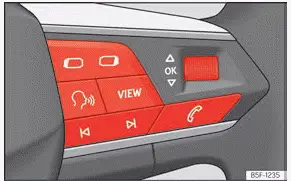
Fig. 10 Right side of multifunction steering wheel: buttons to the menus and informative indications on
the instrument panel (depending on the version).
While a priority 1 warning remains active, menu access is blocked so critical alerts stay front and center.
Certain warnings can be acknowledged and dismissed using the  button on the multifunction
steering wheel ››› Fig. 10.
Select a menu or an informative display
- Switch the ignition on.
- If a notification or vehicle icon is shown on screen, press the
 button ››› Fig. 10, repeating if
needed until the prompt clears.
- Cycle between available menus using the
 or
 buttons.
- Press the
 button to open the chosen menu or
readout, or pause for a few seconds for it to open on its own.
Changing menu settings
- Inside an open menu, rotate the right thumbwheel on the multifunction steering wheel until the setting you
want is highlighted.
A frame highlights the active selection on the display.
- Press the
 button to apply your adjustment.
A checkmark or indicator mark shows that the selected system or feature is active.
Back to menu selection
- Press the or button.
See also:
Identification Numbers
Your vehicle has several identifying numbers in various places.
The vehicle identification number (VIN) is the 17-digit number your dealer uses
to register your vehicle for warranty purposes. It is ...
Loosening wheel nuts
Fig. 195 Tyre change: loosen the wheel nuts.
Fig. 196 Tyre change: tyre valve 1 and the correct position for the
anti-theft wheel locking bolt 2 or 3.
Use strictly the wheel wrench supp ...
Playing FM/AM Radio
“Display audio screen”
You can control the radio using voice
commands.
A visual guide helps you operate the audio
system.
The ST indicator comes on the display for stereo
FM broadcasts. S ...
Categories
