
Seat Arona: Introduction
The dynamic road signs display on the Seat Arona captures standard road signs through a camera mounted in the upper centre section of the windscreen, tucked inside the housing at the base of the interior mirror. It keeps you updated on speed limits and overtaking bans as you drive.
Within its operating limits, the system also shows an additional sign to point out details such as temporary restrictions. Even along stretches without visible signs, it can display the applicable speed limit when needed.
Road sign recognition is not available in every country, so factor that in when driving across borders.
The dynamic road sign display turns on automatically every time you switch on the ignition.
Shown on the display
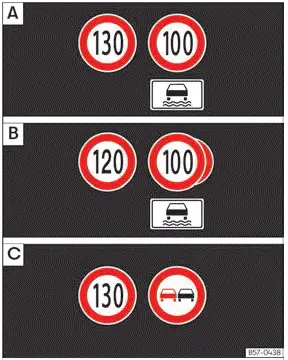
Fig. 8 On the instrument cluster display:
examples of recognised speed limits or
overtaking prohibitions with their respective
additional signs.
In Germany, on motorways and roads reserved for motor vehicles, the system shows end-of-restriction signs alongside speed limits and overtaking rules. Across other countries, it shows the currently active speed limit instead.
Detected road signs appear on the instrument cluster display ››› Fig. 8 and, when your Seat Arona is equipped with a compatible navigation system, on the infotainment screen as well.
Display of road signs
After cross-checking data from the camera, the navigation system, and live vehicle signals, the display can show up to three active road signs ››› Fig. 8 B together with their supplementary signs.
- First: The primary sign currently applying to
you appears on the left side of the screen.
For instance, a maximum speed limit of 130 km/h (100 mph) ››› Fig. 8 A.
- Second: A sign that applies only under specific conditions, such as 100 km/h (60 mph) paired with a rain sign, appears in the second spot.
- Additional sign: Highlights the conditions (such as wet weather, time windows, or fog) under which the shown speed limit takes effect.
- Third: A no-overtaking sign is shown partially in the third position. When there is no conditional speed limit and overtaking is banned, that no-overtaking sign moves into the second position ››› Fig. 8 C.
No entry sign
When driving the Seat Arona, the road sign recognition system triggers an alert on the instrument cluster if you pass a no-entry sign on a one-way street or motorway or highway ramp.
WARNING Camera and navigation road sign recognition cannot alter the limits set by the laws of physics and operates strictly within technical boundaries. Extra convenience from the dynamic road sign display should never tempt you into taking risks on the road.
The system does not replace active attention from the driver.
- Match your speed and driving style to visibility, weather, road surface, and traffic flow.
- Low light, night driving, snow, heavy rain, and fog can stop the system from picking up road signs or cause inaccurate displays.
- If glass or housing over the camera's field of view is dirty, blocked, or damaged, system performance can suffer.
Speed recommendations and traffic signs shown by the road sign detection system may not match live conditions on the road.
- The system cannot read or show every road sign accurately in all situations.
- Physical road signs and local traffic laws always take precedence over alerts and icons shown by the system.
See also:
Service Menu
Inside the Service menu on the Seat Arona, you can access and adjust specific maintenance and setup options
depending on how your vehicle is equipped.
Open the Service menu
Bring up the Range info ...
Front Fender Fairing Replacement
NOTE:
Put on gloves to protect your hands.
Take care not to scratch the body.
Remove the front inner fender as needed.
From the wheel arch, remove the clip an ...
Piston Installation
If the Crankshaft is Already Installed
Set the crankshaft to bottom dead center (BDC) for each cylinder as its
piston is installed.
Remove the connecting rod caps, and check that ...
Categories
