
Honda Fit: Transmission End Cover Air Check Valve Inspection and Replacement (A/T)
NOTE:
-
There are two types of the transmission end cover; the type A and the type B; and both types are available.
-
The differences between the types A and B of the end covers are:
-
The installation position of the air check valves.
-
-
Check the air check valve filter for clogging. If the filter is clogged, remove the air check valves (A), and clean the filter thoroughly by pouring new ATF. Do not blow out the filter with compressed air. If the filter or check valve (ball) is clogged or damaged, replace the air check valve.
NOTE:
-
Replace the sealing washer with a new one whenever the air check valve (came with the sealing washer) is removed or replaced.
-
It is no need to install the sealing washer with the air check valve that came without the washer.
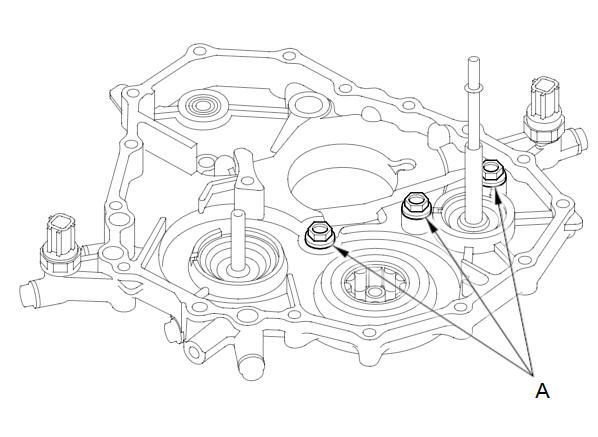
-
-
Install the air check valve (A):
-
On type A end cover: Install the air check valve and a new sealing washer (B).
-
On type B end cover: Install the air check valve. Do not install the sealing washer.
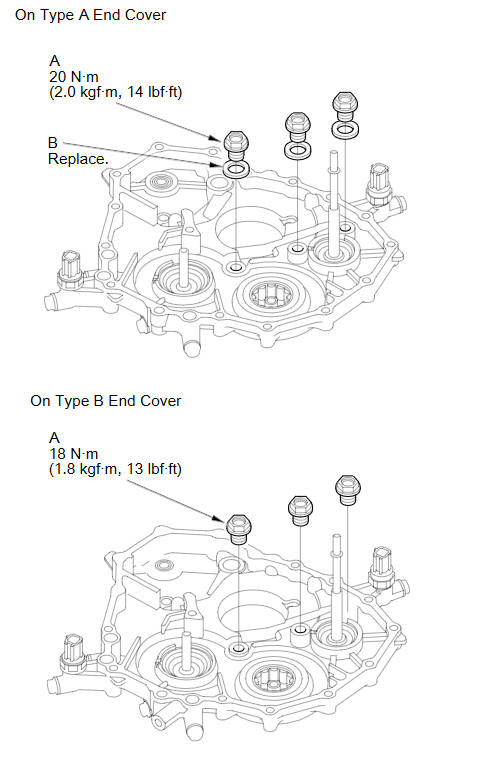
-
-
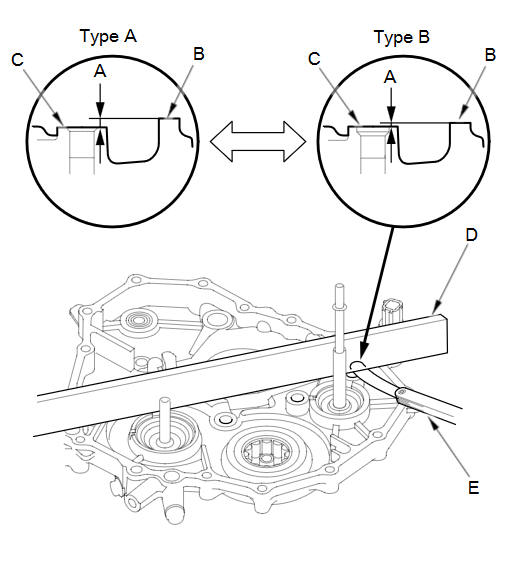
If the classification of the end cover between types A and B is uncertain, measure the clearance (A) between surface (B) of the end cover and installed position (C) of the 2nd check valve with a straight edge (D) and a feeler gauge (E), and determine the end cover of A or B with the measurement.
Measurement
Type A End Cover:
2.00 mm (0.078 in)
Type B End Cover:
0.15 mm (0.005 in)
See also:
Checking the Battery
Check the condition of the battery monthly by looking at the test indicator window.
The label on the battery explains the test indicator’s colors. The test indicator
window’s location differ ...
Selecting Disc Mode
1. Press the CD/AUX button.
2. Insert a disc into the disc slot.
► The disc automatically begins
playing.
3. Select AUDIO/STREET until
AUDIO is highlighted in blue.
► The a ...
Radio Theft Protection
Your vehicle’s audio system will disable itself if it is disconnected from electrical
power for any reason.
To make it work again, you must enter a specific five-digit code in the preset
button ...
Categories
