
Honda Fit: A/T Countershaft Reverse Selector Hub Installation (A/T)
Special Tools Required
- Driver Handle, 40 mm I.D. 07746-0030100
-
Install 1st gear, 2nd gear, 3rd gear, the 33.2 x 40 x 26 mm collar, the 29 mm cotters, and the 33 x 45 x 7.8 mm collar on the countershaft, and secure them with the snap ring.
-
Install the needle bearings and the 4th-5th gear.
-
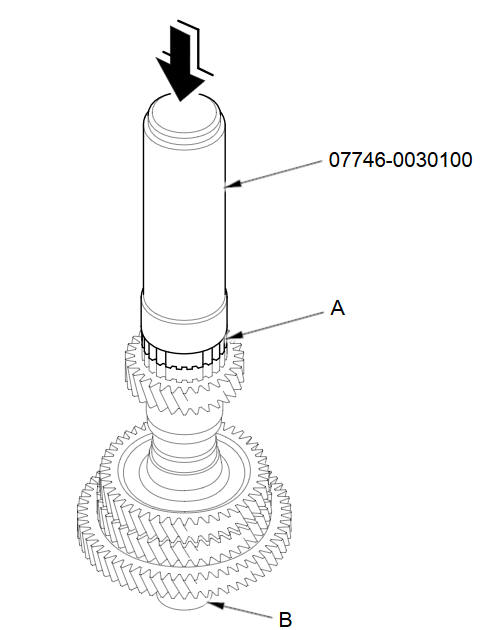
Slide the reverse selector hub (A) over the countershaft (B), then press it in place using the driver handle (40 mm I.D.) and a press.
NOTE: Some reverse selector hubs are not press-fitted, and can be installed without using the a press.
See also:
Adding Engine Oil
Unscrew and remove the engine oil fill cap on the valve cover. Pour in the oil
slowly and carefully so you do not spill any. Clean up any spills immediately. Spilled
oil could damage components ...
Basic Settings
INFO button
► Setup ►Other
►Basic Settings
Set the map units to either miles or kilometers, and control the voice
feedback from
the navigation system.
Select an item.
The ...
Categories
