
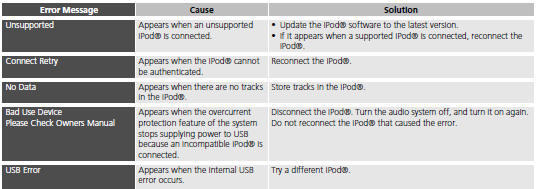
Honda Fit: iPod®
See also:
Combination Light Switch Test/Replacement
Remove the steering column covers.
Disconnect the 12P connector (A) from the combination light switch (B).
@font-face{font-family:
"Honda_Symb ...
Under-Dash Fuse/Relay Box Removal and Installation (Canada models)
Canada models
NOTE: SRS components are located in this area.
Review the SRS component locations, and
precautions and procedures
before doing repairs or servicing.
Removal
NOTE: The ...
Listening to Voice Guidance
MAP MENU (on map)
► VOICE
As you approach each guidance point, a pop-up window is displayed on the map
screen with instructions for you to follow. Voice guidance for each guidance
point is ...
Categories

© 2026 Copyright www.hfitinfo.com