
Honda Fit: Auxiliary Input Jack
Use the jack to connect standard audio devices.
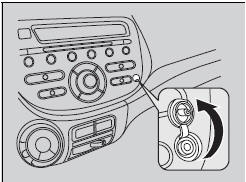
1. Open the AUX cover.
2. Connect a standard audio device to the input jack using a 1/8 inch (3.5 mm) stereo miniplug.
► The audio system automatically switches to the AUX mode.
To switch the mode, press any of the audio mode buttons. You can return to the AUX mode by pressing the AUX button.
You cannot use the auxiliary input jack if you replace the audio system.
See also:
Inboard Joint Side
Remove the boot bands. Be careful not to damage the boot.
If the boot band is welded type (A), cut the boot band.
If the boot band is a double loop type (B), lift up the ban ...
Clutch Interlock Switch Replacement (M/T)
M/T model
Disconnect the 2P connector (A) from the clutch interlock switch.
Loosen the locknut (B), then remove the clutch interlock switch (C).
Install the clutch int ...
Categories
