
Honda Fit: Control Locations
First generation (2001–2008) / Honda Fit 2001-2008 Owners Manual / Instruments and Controls / Control Locations
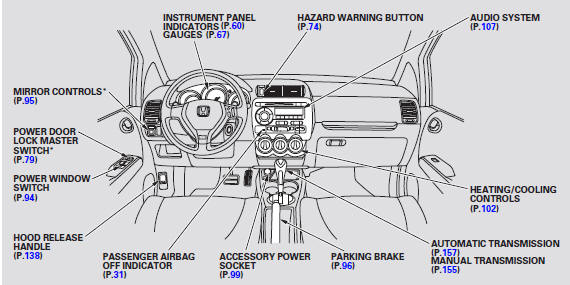
* : If equipped
See also:
Dashboard/Steering Hanger Beam Disassembly/Reassembly (Page-1)
Special Tools Required
KTC Trim Tool Set SOJATP2014
*Available through the Honda Tool and Equipment Program; call 888-424-6857
NOTE:
Put on gloves to protect your hands.
...
Ball Joint Boot Inspection/Replacement
Special Tools Required
Bearing Driver Attachment, 40 mm 07GAF-SE00200
Check the ball joint boot for weakness, damage, cracks, and grease leaks.
NOTE:
If the ball joint boot is ...
Brake Hose Replacement
notice
Do not spill brake fluid on the vehicle; it may damage the paint. If
brake fluid gets on the paint, wash it off immediately with water.
NOTE:
Bef ...
Categories

© 2026 Copyright www.hfitinfo.com