
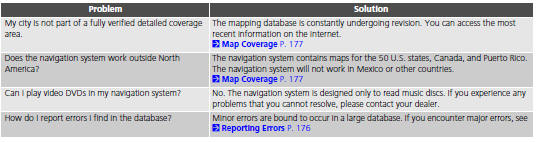
Honda Fit: Update, Coverage, Map Errors
Second generation (2007-2026) / Honda Fit 2007-2026 Navigation Online Reference Manual / Troubleshooting / Update, Coverage, Map Errors
See also:
Special Tools Required
Mainshaft Holder 07GAB-PF50101
Remove the bolts securing the ATF inlet line (D) and ATF filter holder
(E), the line bolt and sealing washers, and remove the ATF inlet line, ATF
hose, ...
Clutch Interlock Switch Replacement (M/T)
M/T model
Disconnect the 2P connector (A) from the clutch interlock switch.
Loosen the locknut (B), then remove the clutch interlock switch (C).
Install the clutch int ...
A/C Refrigerant Recovery (With A/C)
caution
Air conditioning refrigerant or lubricant vapor can irritate your
eyes, nose, or throat.
Be careful when connecting service equipment.
...
Categories

© 2026 Copyright www.hfitinfo.com