
Honda Fit: HFL Menus
Use HFL when the vehicle’s ignition is in the ACCESSORY (I) or ON (II) position.
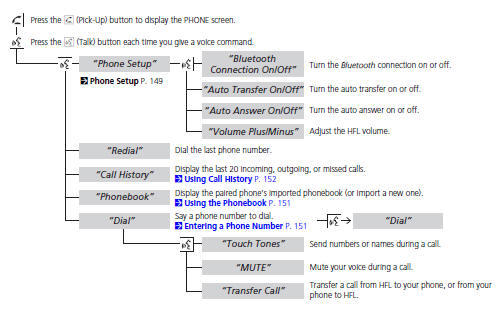
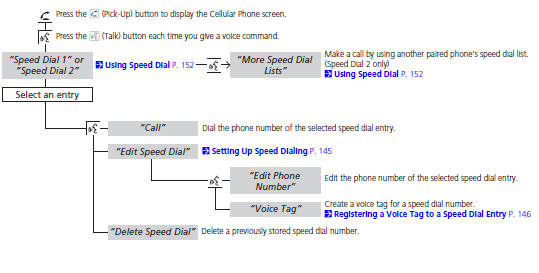
You can operate HFL by voice when on the PHONE screen. Below is the flow chart showing available voice commands.
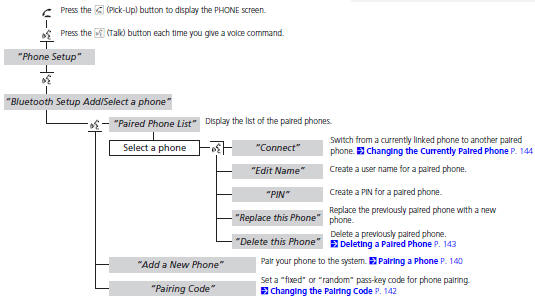
To use HFL, you must first pair your Bluetoothcompatible cell phone to the system while the vehicle is parked.
See also:
Previous Destinations
DEST button
► Previous Destinations
Select an address from a list of your 50 most recent destinations to use as
the
destination. The list is displayed with the most recent destination at t ...
Checking and Maintaining Wiper Blades
Checking Wiper Blades
If the wiper blade rubber has deteriorated, it will leave streaks and the
metal wiper
arm may scratch the window glass ...
Windshield Wipers and Washers
WindshieldWiper
1. MIST
2. OFF
3. INT Intermittent
4. LO Low speed
5. HI High speed
6. Windshield washers
Push the right lever up or down to select a position.
MIST - The wipers run at high ...
Categories
