
Honda Fit: Changing the Route Preference
Change the route preference by selecting minimum or maximum driving methods.
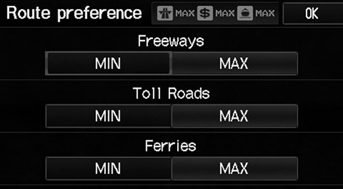
1. Select MIN or MAX for each item.
2. Select OK.
The calculated route may not be the route you would choose. For safety reasons, the system generally applies the following rules to your route:
• Shortcuts through residential areas are avoided.
• Right turns are favored over left turns or Uturns.
• Time-restricted turns (turns prohibited at certain times of the day) are not used.
See also:
Adjusting the Seats
WARNING
Sitting too close to a front airbag can result
in serious injury or death if the front
airbags inflate.
Always sit as far back from the front
airbags as possible while maintaining
cont ...
Remote Transmitter Care
Replacing the Battery
If the indicator does not come on when the button is pressed, replace the
battery.
Battery type: CR1616
1. Unscrew the cover with a small Phillipshead
screwdriver.
υ ...
Routing & Guidance
INFO button
► Setup ►Other
►Routing & Guidance
Choose various settings that determine the navigation system functionality
during
route guidance.
Select an item.
The fo ...
Categories
