
Honda Fit: Place Phone Number
 DEST button
►DEST Menu 2►Place Phone Number
Select a destination by phone number. Only phone numbers in the database are recognized.
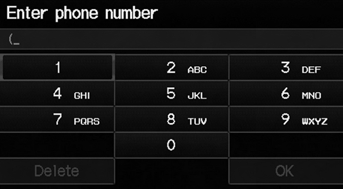
1. Enter the area code and phone number. Select OK.
2. Set the route to your destination.
All 10 digits must be entered.
Phone numbers of private residences entered in your address book are not stored in the database and thus cannot be used to search for a destination.
A list is displayed if there are multiple locations in the database with the same phone number.
Select a place from the list.
See also:
Auxiliary Input Jack
Use the jack in the console compartment to connect standard audio devices.
1. Open the AUX cover.
2. Connect a standard audio device to
the input jack using a 1/8 inch/3.5
mm stereo miniplug.
& ...
CKP Sensor Replacement
Raise the vehicle on a lift.
NOTE: Make sure the vehicle is level, because engine oil will drip out
when you remove the sensor.
Loosen the bolt (A). Remove the bolt (B) and ...
Gauges
TripMeter
This meter shows the number of miles (U.S.) or kilometers (Canada) driven since
you last reset it.
There are two trip meters: Trip A and Trip B. Switch between these displays by
pres ...
Categories
