
Honda Fit: Setting the Clock Type
Second generation (2007-2026) / Honda Fit 2007-2026 Navigation Online Reference Manual / System Setup / Clock Adjustment / Setting the Clock Type
 INFO button
► Setup ►Other
►Clock Adjustment►Clock Type
Set the design of the clock screen.
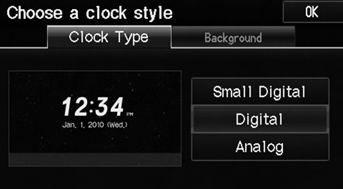
1. Select Clock Type or Background.
2. Select an option to change the design.
3. Select OK.
See also:
Maintenance
This chapter discusses basic maintenance. ...
Electrical
...
PIN Numbers
INFO button
► Setup
►Personal Information►PIN Number
Set a 4-digit PIN for protecting personal addresses and your home addresses.
Once
you set a PIN, you are prompted to ente ...
Categories

© 2026 Copyright www.hfitinfo.com