
Honda Fit: Resetting the Clock Settings
Second generation (2007-2026) / Honda Fit 2007-2026 Navigation Online Reference Manual / System Setup / Clock Adjustment / Resetting the Clock Settings
 INFO button
► Setup ►Other
►Clock Adjustment►Clock Adjustment
Reset all clock settings to the factory defaults.
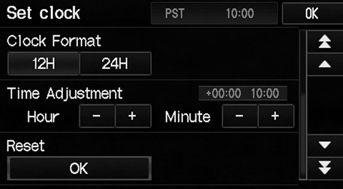
Select OK under Reset.
See also:
Symbols
...
Torque Converter Housing Selector Control Shaft Oil Seal Replacement (A/T)
Special Tools Required
Driver Handle, 15 x 135L 07749-0010000
Oil Seal Driver Attachment 07947-ZV00100
Remove the oil seal from the torque converter housing.
Install the n ...
Installation
Hold the gearbox housing using a C-clamp (A) and wooden blocks (B) to a
workbench as shown. Do not clamp the cylinder part of the gearbox housing in
a vise.
...
Categories

© 2026 Copyright www.hfitinfo.com