
Honda Fit: Edit Waypoint Search Area
 INFO button
► Setup ►Other
►Routing & Guidance►Edit Waypoint
Search Area “Edit”
Select the distance from your highlighted route line (on either side of your route) that the system will search for a waypoint.
You can specify a different search distance for freeways and surface streets.
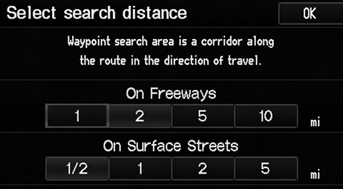
1. Select a search distance.
2. Select OK.
The following options are available:
• On Freeways: 1, 2, 5, or 10 miles can be set. Factory default is 2 miles.
• On Surface Street: 1/2, 1, 2, or 5 miles can be set. Factory default is 1/2 mile.
The search distance does not affect the search
range used for the Find Nearest voice commands
(e.g., say  “Find nearest gas
station”).
See also:
Inspection
Install the flange nut on the damper shaft end, and set the socket wrench
and T-handle on the nut.
Compress the damper assembly by hand, and check for smooth operation
through ...
Multiplex Integrated Control System Description
Body Controller Area Network (B-CAN) and Fast Controller
Area Network (F-CAN)
The body controller area network (B-CAN) and the fast controller area network
(F-CAN) share information between ...
Air Cleaner Removal/Installation
Disconnect the MAF sensor/IAT sensor connector(A), then remove the air
cleaner cover (B) and the air cleaner element (C).
NOTE: Be careful not to damage the MAF sensor/IAT sensor on the air ...
Categories
