
Honda Fit: User Name
 INFO button
► Setup
►Personal Information►User Name
Change the user name (“User 1” or “User 2”) to your desired name.
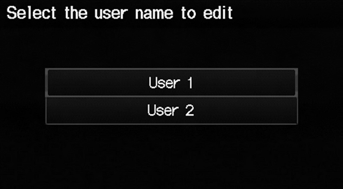
1. Select the name to change.
2. Enter a name. Select OK.
See also:
FTP Sensor Replacement
Remove the EVAP canister.
Disconnect the FTP sensor connector (A).
Disconnect the hose (B), remove the retainer (C), and remove the FTP
sensor (D).
Ins ...
Evaporator Expansion Valve Replacement (With A/C)
Recover the refrigerant with a recovery/recycling/charging
station.
Remove the bolt from the A/C line clamp (A).
@font-face{font-family:
"H ...
Driveshaft Removal
Special Tools Required
Ball Joint Remover, 28 mm 07MAC-SL0A202
Ball Joint Thread Protector, 14 mm 071AF-S3VA000
Raise and support the vehicle.
Remove the front wheel.
...
Categories
