
Honda Fit: Registering a Voice Tag to a Speed Dial Entry
 PHONE button
► Speed Dial 1 or Speed Dial 2
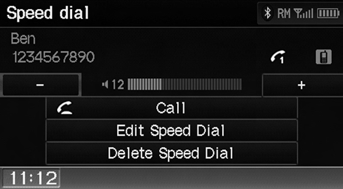
1. Select a speed dial entry.
2. Select Edit Speed Dial.
3. Select Voice Tag.
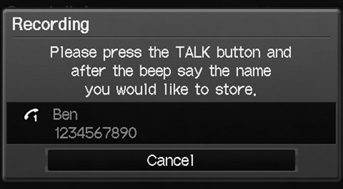
4. Follow the prompt to enter a voice tag.
Voice tags allow you to call speed dial entries
from any screen by saying  “Dial by
voice tag”
and the voice tag, followed by 
“Dial.”
1. Select Delete Speed Dial.
2. Select Yes.
See also:
Wiper Arm Replacement
NOTE: Set the wiper arms to the auto-stop position before removal and
installation.
Windshield
NOTE: Always pull up the driver's side wiper blade first.
Remove the caps, the nuts, and t ...
Radiator Connecting Pipe Replacement
Drain the engine coolant.
Remove the thermostat housing.
Remove the connecting pipe (A).
Install the connecting pipe with a new O-ring (B).
...
Rear Defogger/Heated Door Mirror* Button
Press the rear defogger and heated door
mirror button to defog the rear window and
mirrors when the ignition switch is in ON
.
NOTICE
When cleaning the inside of the rear window, be
careful no ...
Categories
