
Honda Fit: Changing the Front Wiper Blade Rubber
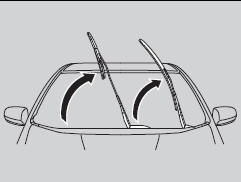
1. Lift the driver side wiper arm first, then the passenger side.

2. Place a cloth on the edge of the lock tab.
Push the lock tab up with a flat-tip screwdriver.
3. Slide the blade from the wiper arm
NOTICE
Avoid dropping the wiper arm; it may damage the windshield.
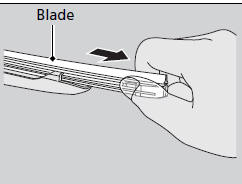
4. Slide the wiper blade out from its holder by pulling the tabbed end out.
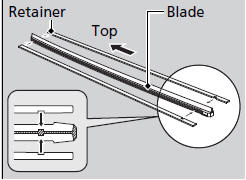
5. Remove the retainers from the rubber blade that has been removed, and mount to a new rubber blade.
► Correctly align the rubber protrusion and the retainer grooves.
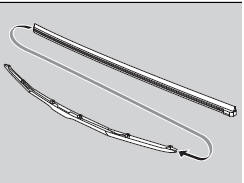
6. Slide the new wiper blade onto the holder from the bottom end.
► The tab on the holder should fit in the indent of the wiper blade.
7. Slide the wiper blade onto the wiper arm, then push down the lock tab.
8. Lower the passenger side wiper arm first, then the driver side.
See also:
Interior Convenience
Glove Box
Pull the handle to open the glove box.
WARNING
An open glove box can cause serious injury
to your passenger in a crash, even if the
passenger is wearing the seat belt.
Always keep ...
Protecting Larger Children
Checking Seat Belt Fit
To determine if a lap/shoulder belt properly fits a child, have the child put
on the seat belt, then ask yourself:
1. Does the child sit all the way back against the seat? ...
Playing an iPod®
Connect the iPod® using your dock connector to the USB adapter cable, then
press
the AUX button.
■How to Select a File from the iPod® Menu
1. Press to display the iPod®
menu.
2. ...
Categories
