
Honda Fit: CD Player
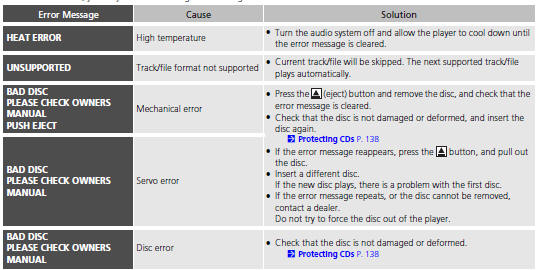
If a disc error occurs, you may see the following error messages.
See also:
Torque Converter Housing Lubrication Check Valve Replacement (A/T)
Remove the sealing bolt (A) and the sealing washer (B).
Remove the lubrication check valve (C) from the torque converter housing
(D).
Install the lubrication check val ...
Features
Audio System
For navigation system operation
See Navigation System Manual
...
Brake Light, Taillight, Back-Up Light and Rear Turn
Signal Light Bulbs
When replacing, use the following bulbs.
Brake/Taillight: 21/5 W
Back-Up Light: 16 W
Rear Turn Signal Light: 21 W (Amber)
1. Pry on the edge of the cover using a flat-tip
screwdriver to remove ...
Categories

© 2026 Copyright www.hfitinfo.com