
Honda Fit: Command Help
For “Command Help” menu items, all voice commands that are available for that system are listed.
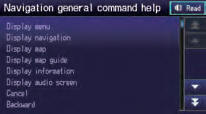
Select Read to hear the commands in the list read aloud.
Voice Commands
See also:
EVAP Canister Replacement
Raise the vehicle on a lift.
Except LX (A/T model): Remove the fuel tank cover (A)
LX (A/T model): Remove the floor under cover assembly (A).
Remo ...
Rear Seat Cushion Leg Replacement
NOTE:
Take care not to tear or damage the seat covers.
Put on gloves to protect your hands.
Take care not to kink the cable.
The left rear seat cushion is shown, the rig ...
If the Low Tire Pressure Indicator Comes On
U.S. models
■ Reasons for the indicator to come on
A tire pressure is significantly low. If the compact spare tire* is installed,
the indicator stays on for a while, and then goes off.
& ...
Categories
