
Honda Fit: Rear License Plate Light Bulb
When replacing, use the following bulb.
Rear License Plate Light: 5 W
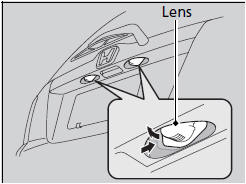
1. Push the lens on the left and pull out the lens and the socket attached to it.
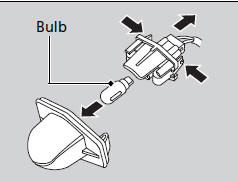
2. Remove the license plate light assembly by squeezing the tabs on both sides of the socket.
3. Remove the old bulb and insert a new bulb.
See also:
Taillight Replacement
Open the tailgate and remove the maintenance lid.
Disconnect the connectors (A) from the taillights (B).
@font-face{font-family:
"Honda_SymbolMar ...
A/T Housing Idler Gear Shaft Removal and Installation (A/T)
Remove the snap ring (A), the cotter retainer (B), and the cotters (C)
from the idler gear shaft (D), then remove the idler gear shaft. Do not
distort the snap ring.
Check ...
Vehicle Identification Number
@font-face{font-family:
"Honda_SymbolMarkeng";src:url(/statics/ho_prod_2/txt/Honda_SymbolMark_enu3.txt);}@font-face{font-family:
"Honda_Sp ...
Categories
