
Seat Arona: ACC operation
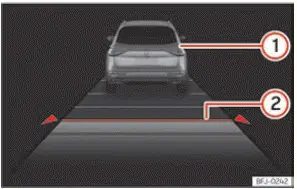
Fig. 101 On the instrument cluster display:
ACC active.
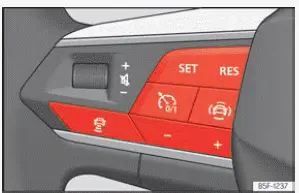
Fig. 102 On the multifunction steering wheel:
buttons for operating the ACC.
- Vehicle detected ahead; this indicator lights up once a target following distance is set.
- Selected following distance level 2.
This ACC status information can appear on the central section of the Assistants view or inside the left-hand information profile; if neither view is active, a simplified version shows automatically in the lower centre of the instrument cluster.
Your chosen target speed is shown right next to the ACC status indicator.
Connecting
- Press the
 button on the multifunction steering
wheel ››› Fig. 102.
At this point, ACC is turned on in standby mode and is not actively controlling speed yet.
Start regulation
Enabling ACC also switches on Electronic Stability Control (ESC) and Traction Control (TCS) automatically.
- Press the
 button ››› Fig. 102 to begin speed
regulation.
ACC stores your current road speed—or the nearest speed inside the allowed range—as the target cruising speed.
On automatic transmission models, the selector lever must be in D, S, or M.
On manual transmission models, you must be in any forward gear except 1st or reverse, travelling above roughly 30 km/h (18 mph).
Depending on driving conditions and target detection, these indicator lamps appear:
 Lights up green
ACC is active and regulating speed, with no vehicle detected in front of your Seat Arona.
 Lights up green
ACC is active and has detected a vehicle ahead.
Whenever ACC sits in standby mode, the indicator lamps show in grey.
Program the speed
To set your target speed, press the  or
 ››› Fig. 102 buttons until you reach the
speed you want, adjusting in steps of 10 km/h (5 mph).
Once ACC is actively regulating on your Seat Arona, tapping the  button raises the set speed by 1 km/h (1 mph), while pressing
 lowers it by 1 km/h (1 mph).
Program the distance setting
You can choose among five following-distance levels, spanning from very short to very long:
- Press the
 button and then use the adjustment buttons ››› Fig. 102.
- Or press the
 button repeatedly until your preferred distance level is
selected.
Always observe local traffic rules regarding minimum following and braking distances in the country where you are driving.
Suspend regulation (standby)
- Tap the
 button ››› Fig. 102 or press the brake pedal.
The ACC indicator lamp turns grey while your saved speed and distance remain stored.
Turning off ESC or TCS pauses ACC regulation automatically.
Reinstating the cruise control
- Press the
 button so ACC regulates back to your previously saved
speed and distance setting.
- Or press the
 button to regulate around your current driving speed.
Switching off
- Press and hold the control button to turn ACC off and clear the saved speed from memory.
Exceeding the speed regulated by the ACC
With ACC turned on, you can accelerate past the set speed using the accelerator pedal; active ACC speed control pauses while you press the throttle and resumes once you lift your foot off.
Changing the drive profile
On a Seat Arona equipped with SEAT Drive Profile, the chosen profile can shape how briskly ACC accelerates and brakes.
Even without SEAT Drive Profile, selecting available drive profiles under Drive assist in the infotainment menu can alter ACC behavior in the same way as SEAT Drive Profile settings.
WARNING
Make sure the path ahead is clear before setting off, since the front radar sensor may miss obstacles on the road, creating a risk of crashes and serious injury; apply the brakes whenever needed.
NOTICE
When you accelerate manually with the throttle pedal, ACC may be unable to regulate speed or following gap safely within its system limits.
- Stay ready to intervene promptly if road or traffic conditions demand it.
See also:
Rear Brake Shoe Replacement
caution
Frequent inhalation of brake pad dust, regardless of material composition,
could be hazardous to your health.
Avoid breathing dust particles.
...
Types of Airbags
Your vehicle is equipped with three types of airbags:
• Front airbags: Airbags in front of the driver’s and front passenger’s seats.
• Side airbags: Airbags in the driver’s and front passe ...
Front Brake Caliper Overhaul
caution
Frequent inhalation of brake pad dust, regardless of material composition,
could be hazardous to your health.
Avoid breathing dust particles.
...
Categories
