
Seat Arona: Locking and unlocking with the Keyless Access system
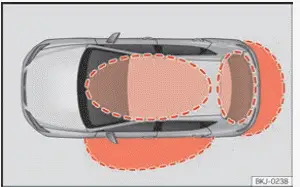
Fig. 47 Keyless Access: proximity zones.
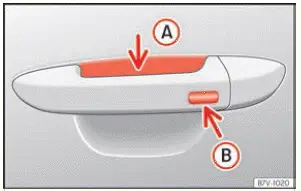
Fig. 48 Door handle: sensor surfaces.
- Unlocking sensor surface on the inside of the door handle.
- Locking sensing surface on the outside of the door handle.
Depending on vehicle specification, your Seat Arona may feature the Keyless Access system, which lets you lock and unlock the vehicle—and start it without active key operation—as long as a valid key is inside the relevant detection zone for the door or hatch you are accessing.
Unlocks the vehicle.
- Touch the inner unlocking sensor A inside the door handle; all turn signals flash twice.
Where selective opening is configured, touching the inner sensor twice unlocks all doors and access points.
If the Seat Arona stays unlocked for an extended period, proximity unlocking turns off automatically and reactivates the next time you unlock the vehicle with the remote control.
Locks the vehicle.
- Bring the Seat Arona to a stop and park it safely.
- Touch the outer locking sensor B ››› Fig. 48 on the exterior of the door handle so all turn signals flash once.
To let you confirm the Seat Arona is locked, touch-unlocking pauses for a few seconds right after locking.
Unlocking the rear lid
When the Seat Arona is locked and a valid key is within the rear proximity zone, operating the rear lid release unlocks it automatically, and the rear lid locks again once closed.
Temporarily deactivating the Keyless Access system
You can temporarily switch off the Keyless Access unlocking function on the Seat Arona:
- Shift the gear selector into P, since the vehicle cannot be locked otherwise.
- Lock the vehicle by pressing the lock button on the key.
- Within 5 seconds, tap the outer door handle sensor once ››› Fig. 48 B.
Avoid grasping the handle while tapping the sensor; doing so temporarily disables Keyless Access unlocking.
- Wait at least 10 seconds and pull the door handle to verify that the door stays locked and will not open.
Afterward, you must unlock the vehicle remotely using the key's electronic button, and unlocking it that way restores normal Keyless Access operation.
Comfort functions
To roll up all power windows at once via the comfort closing function, hold your finger against the outer locking sensor ››› Fig. 48 B (arrow) on the door handle until every window finishes closing.
Door unlocking behavior from the handle sensors follows your infotainment preferences under  >
Settings > Opening and closing.
See also:
Fuel and Emissions System Description - Electronic Throttle Control System
Electronic Throttle Control System
The throttle is electronically controlled by the electronic throttle
control system (ETCS). Refer to the system diagram to see a functional
layout of the ...
Charging System Indicator
If the charging system indicator comes on brightly when the engine is running,
the battery is not being charged.
Immediately turn off all electrical accessories. Try not to use other electrically ...
Output Shaft (Countershaft) Speed Sensor Replacement (A/T)
Remove the air cleaner assembly.
Disconnect the output shaft (countershaft) speed sensor connector, and
remove the output shaft (countershaft) speed sensor (A).
...
Categories
