
Seat Arona: Basic version digital instrument cluster
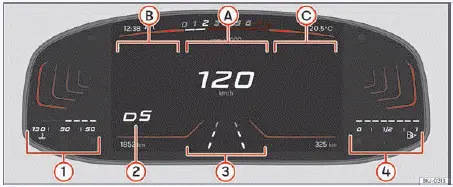
Fig. 1 Basic version digital instrument cluster: Main
view.
Upper zone: Current time, active drive profile, rev counter, and outside temperature reading. Lower zone: total odometer distance in kilometres or miles—or the target speed set for cruise control or ACC—alongside estimated driving range.
- Main display: digital speed readout and recognised road signs.
- Secondary indications: trip and driving metrics such as average speed, fuel consumption, and trip distance.
- Secondary indications: audio source, media playback, phone status, and navigation prompts.
- Engine coolant temperature indicator
- Gear engaged and gear or selector lever position recommendation for efficient shifting
- Selected driving assistant status
- Fuel gauge showing remaining tank level
The Basic version digital instrument cluster on the Seat Arona uses a crisp, high-resolution colour TFT screen to present driving data clearly.
You can tailor what appears on screen by switching between layouts—such as the rev counter view—and choosing different readouts for the central zone and side zones.
Instrument cluster operation
You operate the digital instrument cluster strictly through the controls on the multifunction steering wheel, with exact button behaviour depending on your Seat Arona specification.
While a priority 1 warning is active, menu access stays locked so urgent safety alerts are not missed.
Certain alerts can be acknowledged and cleared from view using the  button on the
multifunction steering
wheel.
Instrument cluster views
Step through the available screen layouts by pressing the
 button on the multifunction
steering wheel.
Available views include:
- Main: Digital speed readout paired with secondary side displays.
- Speed: Traditional round dial speedometer with secondary readouts tucked inside the centre of the gauge.
- Rev counter: Traditional round dial rev counter with secondary readouts displayed in the middle of the gauge.
Exact screen layouts and available readouts depend on how your Seat Arona is equipped.
Note
Once you switch off the ignition, a summary screen briefly shows vehicle status details such as distance covered on the trip.
Select secondary indications in the "Main" view Side zones B and C can each be customised or hidden to suit what you want to see in your Seat Arona. Follow these steps to pick your secondary indications:
1. Press  and
 to highlight either the right
B side or the left C side secondary indication area.
2. Roll the thumbwheel on the multifunction steering wheel to cycle through the available secondary readouts.
3. Lock in your choice by pressing the
 button.
Selecting secondary indications in the "Speed" or "Rev counter" views
1. Roll the thumbwheel on the multifunction steering wheel to highlight the secondary readout you prefer.
2. Press  to confirm your selection.
Note
If fault warnings show up right when you switch on the ignition, changing cluster settings or viewing certain items may be limited until the issue is resolved. If the fault persists, have a qualified specialist workshop inspect it; SEAT recommends going to a SEAT dealership.
See also:
Fuses in the engine compartment. Fuse placement
Fuses in the engine compartment
Fig. 168 In the engine compartment: lid of the
fuse box.
To open the engine compartment fuse box
Open the bonnet ››› on page 271.
Push in the locki ...
Warning levels and brake assist
Fig. 108 On the instrument panel display:
advance warning indications.
Front Assist becomes active from roughly 5 km/h (3 mph). Depending on factors such as vehicle speed and the speed
and ...
Steering Wheel Installation
SRS components are located in this area.
Review the SRS component locations, and the
precautions and procedures before doing
repairs or service.
Before installing the steering ...
Categories
