
Honda Fit: Recommended CDs
• Use only high-quality CD-R or CD-RW discs labeled for audio use.
• Use only CD-R or CD-RW discs on which the recordings are closed.
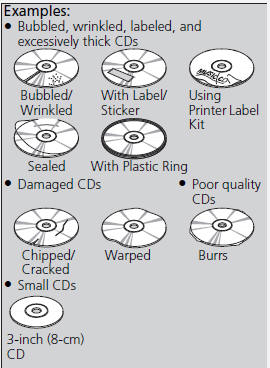
• Play only standard round-shaped CDs.
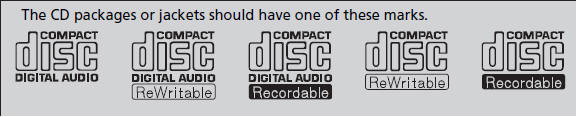
A Dual-disc cannot play on this audio unit. If recorded under certain conditions, a CD-R or CD-RW may not play either.
■CDs with MP3 or WMA files
• Some software files may not allow for audio play or text data display.
• Some versions of MP3 or WMA formats may be unsupported.
■ Protecting CDs
Follow these precautions when handling or storing CDs:
• Store a CD in its case when it is not being played.
• When wiping a CD, use a soft clean cloth from the center to the outside edge.
• Handle a CD by its edge. Never touch either surface.
• Never insert foreign objects into the CD player.
• Keep CDs out of direct sunlight and extreme heat.
• Do not place stabilizer rings or labels on the CD.
• Avoid fingerprints, liquids, and felt-tip pens on the CD.
NOTICE
Do not insert a damaged CD. It may be stuck inside and damage the audio unit.
See also:
Registering a Voice Tag to a Speed Dial Entry
PHONE button
► Speed Dial 1 or Speed Dial 2
1. Select a speed dial entry.
2. Select Edit Speed Dial.
3. Select Voice Tag.
4. Follow the prompt to enter a voice
tag.
Voice tags allow ...
Using the Tailgate Open Handle
Models with remote transmitter
When all the doors are unlocked, the tailgate
is unlocked.
All models
Pull up the tailgate open handle and lift open
the tailgate.
To close the tailgate, grab ...
Guidance Menu
MAP MENU (on map)
►Guidance Menu
Display the guidance points and freeway exits for your route, and set the
display
mode for the map and guidance screens.
Select an item.
The following ...
Categories
