
Honda Fit: CD Player
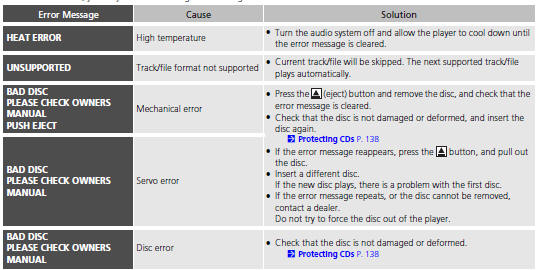
If a disc error occurs, you may see the following error messages.
See also:
Transmission End Cover Park Lever Stop Inspection and Adjustment (A/T)
Set the park lever in the P position.
Measure the center-to-center distance (A) between the park pawl shaft (B)
and the park lever roller pin (C).
Sta ...
Checking and Maintaining Wiper Blades
Checking Wiper Blades
If the wiper blade rubber has deteriorated, it will leave streaks and the
metal wiper
arm may scratch the window glass ...
Recommended Discs
• Use only high-quality CD-R or CD-RW discs labeled for audio use.
• Play only standard round-shaped discs.
The disc packages or jackets should have one of these symbols.
■ Discs with M ...
Categories

© 2026 Copyright www.hfitinfo.com